

READY TO SELL drawing tablets ONLINE?
Get a store built for you in 5 days, plus training and support to help you start, run, and grow your Alternative business.

Learn how to sell drawing tablets online: compare device types, test model compatibility, calculate landed costs and write listings that set clear expectations.


A drawing tablet can be a screenless pen tablet, a pen display connected to a computer, or a standalone drawing computer. They share a search phrase but differ in price, setup, delivery risk and support needs. A useful product page tells buyers what is in the box, which devices it works with and what else they need to draw.
To sell drawing tablets online, choose one buyer and device type, check the exact model and accessories, test a sample on the systems you plan to support, calculate the full delivered cost and explain compatibility before checkout. Start with a small range, then use buyer questions, completed orders, returns and contribution to decide what to add.
This is practical starting information for small sellers and resellers. Product rules depend on the product, your role and where you trade. Check current guidance for Great Britain, Northern Ireland and each export market before placing stock for sale.
A clear store page can explain product options, setup and next steps. Explore MLFG’s website service or talk through your shop plans.
“Artists” is too broad to shape an opening catalogue. A student may need an affordable screenless tablet for a laptop and a drawing app already in use. An illustrator may compare active area, pen feel, tilt, shortcut controls and screen size. A photographer may need a pen display for masking and retouching. A teacher may want models that work across a computer lab. A hobbyist may care most about easy setup and clear instructions.
Choose one person, task and buying context. For example: “I help beginner illustrators choose a compact pen tablet that works with their Windows laptop and drawing software.” Another could be: “I help small studios compare pen displays by screen area, stand, connection method and support.” These statements make it easier to decide which items belong in the first range.
Speak with people from that group. Ask what device they draw on now, what they tried before, what felt awkward, which computer and operating system they use, what software they rely on, and what made them keep or return a device. Ask for exact model names. “It did not work with my laptop” could mean a missing driver, unsupported connection, out-of-date operating system or a cable that carries power but not data.
Record the person, task, computer, software, question and next step. Separate a preference from a buying signal. “I like the pink one” is a preference. “I need this active area, can give you my laptop model and want a quote for two” is a useful lead. Use the language people use, then check it against product documentation.
Prepare a one-page offer for one exact model. Include product type, active area or screen size, connection, pen and nibs, supported operating systems, software note, delivery estimate and proposed price. Use a supplier image only when you have permission and it depicts the version you plan to ship.
Show the offer to a relevant class, design group, existing customer list or local creative business. Invite a clear action: ask a compatibility question, join a restock list or request an update after the sample arrives. A preorder creates delivery and refund obligations. Take payment only when stock timing, terms and fulfilment are realistic.
Set a review limit before paying for promotion. For example, review after 20 buyer conversations or 100 relevant visits. Those are planning thresholds, not sales benchmarks. Record the audience, offer, price, clicks, questions, sign-ups, orders, cancellations, returns and time spent helping customers. Change one main feature at a time so the result can teach you something.
Ask people who did not order what they could not confirm. If several need to know whether a model works with an iPad, add exact supported model details and any adapter requirement. If buyers cannot tell a screenless pen tablet from a pen display, improve the first image, title and first sentence before buying traffic.
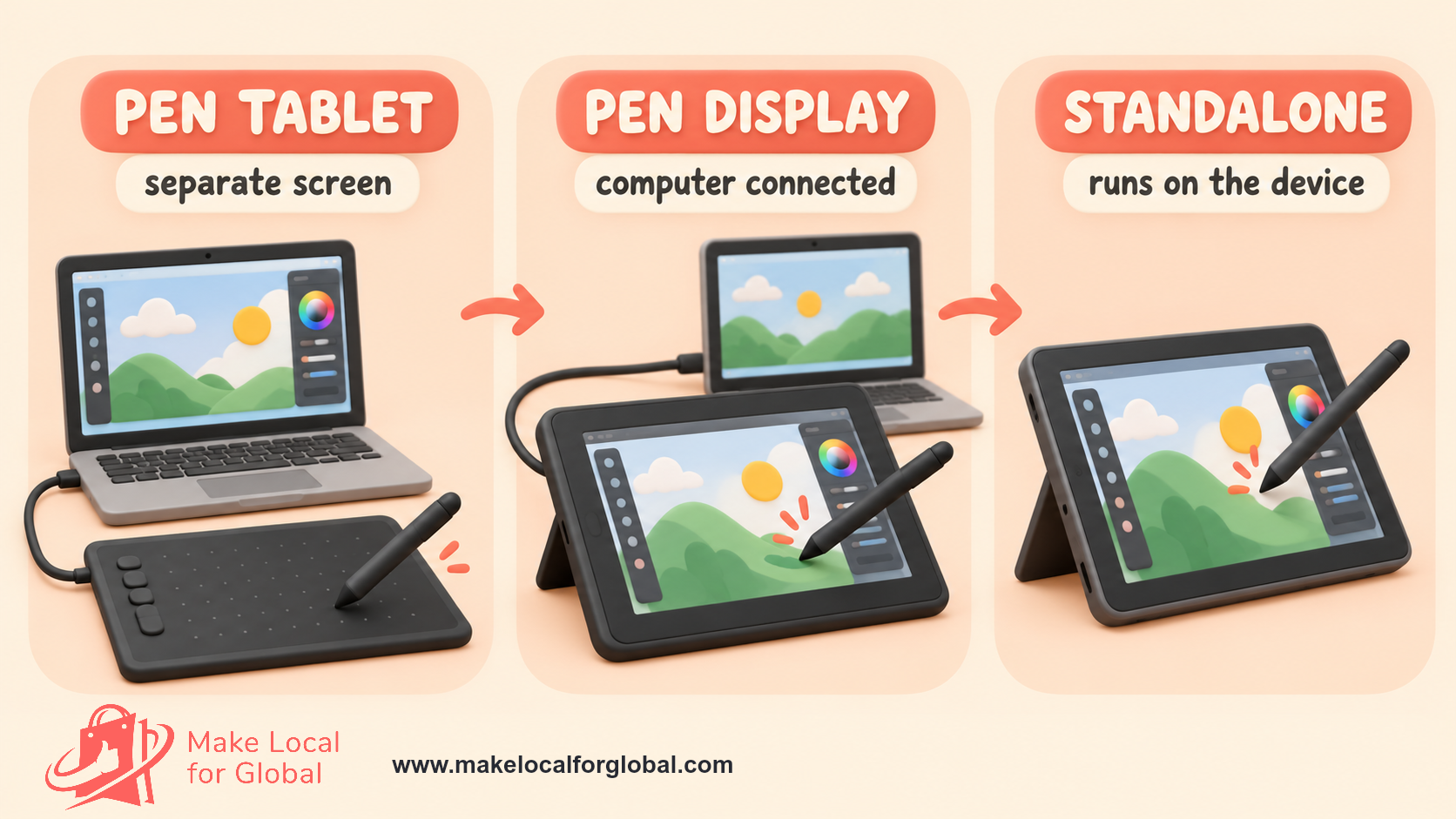
A pen tablet has a drawing surface and stylus, then connects to a separate computer or supported mobile device. The user draws on the tablet and looks at the separate screen. A pen display accepts pen input on its own screen and connects to a computer; that screen does not always mean the device is a standalone computer. A standalone drawing tablet includes its own operating system and apps, so it may work without a separate computer.
Some products called drawing tablets are general-purpose tablets paired with a stylus. Others are built for signatures, annotation or classroom work. Follow the maker’s category and supported workflow. Touch input, stylus support or a USB-C socket alone does not prove that a particular drawing app will work.
A first catalogue could focus on one device type and offer a compact entry model, a larger model and an accessory bundle only where you can support them. A pen-display range may need separate screen sizes, stands and connection kits. A standalone model brings storage, charger, app and update questions. Do not list each under a generic tablet SKU.
| Type | Likely task | Details to confirm | Listing point to make clear |
|---|---|---|---|
| Pen tablet | Draw with eyes on a separate screen | Active area, pen, cable, driver, supported device | No screen; computer or supported device required |
| Pen display | Draw on a connected screen | Screen size, ports, stand, power, host computer | Display may need a separate computer |
| Standalone drawing tablet | Draw on the device | Operating system, storage, apps, charger, updates | App and accessory limits |
| Signature tablet | Capture signatures or notes | Supported software, screen, connection, intended task | Drawing features may be limited |
Use the exact model specifications and tested configuration for each listing.
Do not promise the same workflow for every type. A screenless model can suit a small desk or low starting budget, yet someone who expects to draw directly on a screen needs a different product. Explain what the buyer sees, connects and installs.
Start with products that serve distinct needs. A screenless entry model, a medium model with more active area, and a pen display can make a sensible comparison only if you can support all three. If your first audience uses laptops and is new to digital drawing, two pen tablets may be enough. Avoid a catalogue filled with near-identical colours and model names that hide different cables or pens.
For each item record manufacturer, model, seller SKU, supplier SKU, region, colour, hardware revision, components, package size, packed weight, serial or batch method and available quantity. Keep a photo of the box label and copy of the supplier specification. Create a separate SKU for bundles so staff can see whether a stand, case, glove or spare nibs are included.
An entry, core and specialist structure can help a buyer compare without implying the highest price suits everyone. The entry item might serve a student with a laptop. A core item could add active area or shortcut keys. A specialist model might supply a pen display for a user who wants to draw on a screen. State the practical change and who may need it.
Bundles should solve an actual setup problem. A display, compatible stand and correct cable can form a ready-to-connect kit if the maker confirms the combination. A sleeve must fit measured dimensions. Replacement nibs must match the exact pen. List each included piece and price. Keep optional products outside the package list, and photograph the bundle as shipped.
Decide which variants you can count accurately. For every colour or size, check whether it changes the model number, driver, power supply or warranty. Ask the supplier if product revisions are sent under an unchanged catalogue name. Add another style only when buyer evidence gives you a reason, such as repeated requests for a distinct use.
Use the exact model’s current technical sheet. Useful fields include active area, screen diagonal, resolution, aspect ratio, pen type, pressure response, tilt support, shortcut controls, touch, cable and port, power, pen charging, supported operating systems, driver, compatible software, package contents, dimensions, weight and warranty route.
Pressure sensitivity is one specification. A higher stated level does not prove that every artist will prefer that pen. Response depends on tablet, pen, driver, software and user. Avoid ranking products from this number alone. If you make a demo, state the model, driver and app used rather than claiming a universal drawing result.
For pen tablets, show active drawing area separately from outer dimensions. A large case may surround a smaller active area, and the drawing area can map to all or part of a computer screen. For pen displays, state screen dimensions and resolution, then explain any connection or scaling limit the maker identifies. For standalone models, list storage and whether drawing apps are installed, trial-only or sold separately.
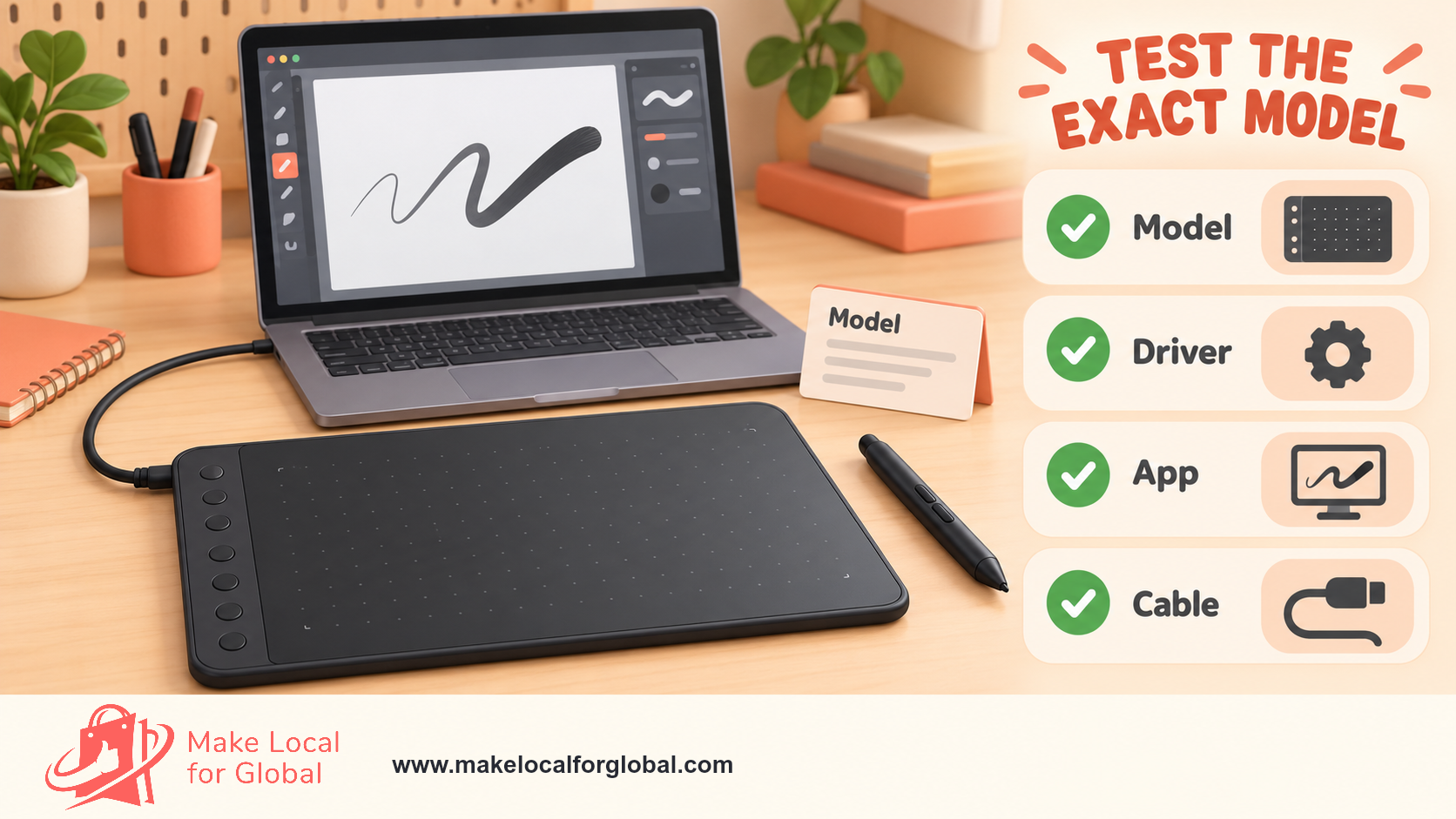
Compatibility must be model-specific. List the operating system versions named by the maker, and check them before writing the product page. An update can change driver support. Note if the device needs a data cable, adapter, graphics output, power supply or a particular port. USB-C connector shape alone does not confirm video output or full data support.
Wacom and Huion publish model-level specifications that vary by product. Those are examples of why a seller should check the exact SKU instead of copying a brand-wide feature statement. Link to the maker’s model page where possible, and distinguish sourced specifications from measurements you took yourself.
Order a sample of each model you intend to list. Record model label, serial or batch, hardware revision and included pieces before opening the carton. Compare the delivered item with the supplier sheet. If pen, cable, power adapter or stand differs, stop and get the revision clarified before accepting stock.
Install the official driver on a test computer that meets the published requirements. Avoid unknown driver mirrors. Check that the device is recognised, cursor alignment is sensible, pen pressure works in a supported drawing app, shortcut controls respond and the device reconnects after a restart. Save the operating system, driver and app version with the test result.
Test each system you intend to name. A model working on one Windows laptop does not prove support for every Windows version, Mac, Chromebook, Linux computer, Android device or iPad. If you cannot test the whole matrix, attribute compatibility to the manufacturer and direct customers to its page for their exact device and operating system.
Inspect screen surface, pen buttons, nib fit, ports, shortcut keys, stand joints, power supply, cable strain relief and packaging. Test the supplied adapter as instructed. Note dead pixels or defects through the supplier’s documented process. Stop and seek supplier advice if there is damaged insulation, a loose socket, cracked screen, unusual heat, smell or other fault.
Keep a sheet with check, result, evidence and action. If hardware changes, repeat affected checks. A listing should match the batch that ships, not an old sample from a discontinued revision. Keep photos of the label, accessories and setup to answer a later support question.
Supply routes may include a UK wholesaler, brand-authorised distributor, manufacturer, import agent or private-label maker. Compare stock ownership, minimum order, payment terms, lead time, replacement pen and nib access, warranty route, defect process and technical support. A low unit price can be offset by slow replacements or an expensive return route.
Request the exact model and revision, specification sheet, English instructions, power-adapter details, supported regions, conformity papers where applicable, importer details, product marks, battery and WEEE information, packed measurements and end-of-life notice. Ask how the supplier shares driver changes, component substitutions, safety notices and discontinued-part updates.
Check that the seller is authorised to distribute the brand, and get permission for product images and copy. Keep invoices, product records, declarations, emails, sample photos and batch details together by SKU. If you import, check duties for your role and destination before paying for stock.
Ask who pays for a faulty unit, what evidence is needed, how quickly a replacement ships, whether individual pens can be replaced and what the buyer should do if a warranty claim starts after installation. Read the customer-facing warranty terms; the supplier’s process does not automatically replace your own responsibilities as a seller.
Drawing tablets and many accessories are electrical and electronic equipment. A reseller of compliant goods sourced within Great Britain has different duties from a business that imports, modifies or sells equipment under its own brand. An importer may need to check conformity, keep technical records and declarations, identify itself, supply English instructions and investigate complaints. Great Britain and Northern Ireland have distinct rules in some areas.
Read current Office for Product Safety and Standards guidance for the Electrical Equipment (Safety) Regulations 2016 and RoHS requirements. Ask the maker or supplier for records covering the exact model. Do not make a declaration, copy a conformity mark from a different product or rely on a marketplace listing as proof. Get advice from the regulator or a qualified product-safety adviser when your role is unclear.
WEEE requirements apply to online and mail-order sellers. A retailer selling a new electrical item may need to provide free like-for-like take-back or join the Distributor Take Back Scheme where eligible. Explain the arrangement to customers and keep records as required. Check current scheme rules; being an online-only shop does not by itself remove the duty.
If the tablet or stylus contains a portable battery, check the producer and retailer requirements. Guidance distinguishes the business that first places batteries on the UK market from retailer take-back duties, which can depend on annual battery supply. Give accurate battery information and follow current carriage rules for the battery type and configuration.
Duties depend on the product, supply chain, territory and whether you are manufacturer, importer or distributor. The official links here are starting points, not a legal decision for one business. Keep a dated compliance note per SKU and get specialist help if you cannot identify your role.
Start with the current supplier quote and an actual packed parcel. Include product cost, inbound freight, customs or handling where relevant, payment or marketplace fee, packaging, delivery, return or damage allowance, customer-acquisition spend and order labour. Keep monthly overhead and tax separate. Record whether supplier and retail figures include VAT.
This example is illustrative for a screenless pen-tablet bundle. It is a working method, not a quote or typical retail margin. Replace each line with a current amount from your business.
| Cost line | Example |
|---|---|
| Tablet and matched pen | £72.00 |
| Inbound freight allocation | £4.00 |
| Outer packaging and protection | £2.40 |
| Payment and selling fees | £6.60 |
| Outbound delivery | £5.20 |
| Return and damage allowance | £3.00 |
| Customer acquisition per order | £7.00 |
| Variable cost before VAT/tax treatment | £100.20 |
| Example selling price | £139.00 |
| Balance before fixed cost and tax | £38.80 |
Illustrative figures only. Replace these assumptions with current quotes and your own costs.
The £38.80 is contribution after the listed variable costs. It is not net profit. It excludes subscriptions, accounting, storage, insurance, owner pay and tax. Payment fees may be a percentage of checkout amount; calculate them from the provider’s current terms. A returned order can remove the revenue and leave outbound or handling cost.
Model low, expected and high return cases. A fragile display, unclear compatibility or a long repair wait can increase support cost. Compare tracked services, signature and insurance with the parcel value and current carrier conditions. Recalculate after a change in supplier, platform, courier or fees.
Set a price from costs and buyer value, then compare offers with the same tablet type, size, accessories and warranty. A basic pen tablet should not be compared directly with a display bundle. Check whether another price includes VAT, pen, stand, software or delivery. A sale price alone is not evidence of a usual selling price.
Decide your minimum contribution before ordering. Run one scenario with paid advertising and one without. If a discount leaves too little to cover a return or a support call, change the bundle, supplier, channel or price. Rely on accessory sales to justify a low-priced tablet only when repeat-order data supports that choice.
A useful bundle has tested fit. A stand must suit the exact display. A sleeve should fit measured dimensions. Nibs must fit the pen. Show total price and included pieces. State whether software is included, trial-only or sold separately, using the software publisher’s licence information.
Review prices when exchange rate, supplier quote, postage, platform fee or warranty provision changes. Keep the date and reason. A sheet with selling price, landed product cost, fees, delivery, return allowance, customer-acquisition cost and contribution helps reveal when a low headline price makes each order unworkable.
When your models and costs are clear, organise the offer around the questions buyers ask. See website design options or contact MLFG about your project.
Start with product type and exact model. A readable title could say “Brand Model pen tablet, medium active area, USB-C, Windows and macOS” if those details match the maker’s current specification. A pen display title should name the display so a buyer does not mistake it for a screenless tablet. Avoid stacking near-identical search phrases in the title.
Open with a plain description of what the device does and what it needs. For example: “A screenless pen tablet for drawing on a compatible Windows or Mac computer. Connect with the supplied data cable, install the maker’s current driver, then use it with supported drawing software.” Only use each detail when the exact model documentation supports it.
Add model, type, active area or display size, resolution, pen, pressure response, tilt, shortcut keys, ports, power, operating systems, supported apps, included pieces, measurements, weight, warranty contact and shipping dimensions. Say which details come from the manufacturer and which you measured. Mark optional items clearly.
Place a compatibility check before checkout: host model, operating system and version, available ports, driver, drawing app, power needs and any required adapter. Link to the exact model support page. A generic “works with PC and Mac” may mislead when models or operating systems differ.
Include care, dispatch and return information. Explain screen film, nib replacement, cable handling, cleaning and storage using the maker’s directions. Do not claim a buyer loses statutory rights by opening packaging or installing a driver. Give a direct support route for setup problems.
Photograph the correct model and hardware revision: front, back, active area or display, pen buttons, ports, stand, adapter, cables, box label and all included items. Use a clear background and room around the product. Do not show a computer, glove, app licence or stand as included when it is sold separately.
A setup photo can show a model connected to a compatible laptop, but state optional equipment and name the tested operating system and app. A close view of the active area helps customers judge scale. Keep screenshots true to the maker’s software and do not use protected artwork without permission.
Add a diagram for active area or dimensions if it helps compare models. Use millimetres and inches only after checking conversion. For a display, show a scale reference without presenting it as a comfort claim for everyone. Keep labels readable on mobile. Use descriptive file names and alt text such as “screenless pen tablet beside a laptop showing the drawing setup”.
Track which photo belongs to which SKU. If the maker revises pen or cable, replace the photo and check the listing. A buyer who receives a different connector from the product page is likely to need help or request a return.

Marketplaces bring a familiar checkout and audience, with fees, listing rules and price comparison. Your own store allows more control over compatibility notes, bundles and follow-up but requires relevant traffic and checkout management. A partnership with an art class or design studio may help you learn, with permission and clear terms. Choose a channel that fits the buyer and your support capacity.
Use phrases customers actually use: “screenless drawing tablet for Windows”, “pen display with stand”, “active area size”, “drawing tablet for Mac” or an exact model number. Check search data from your own analytics and search tools before choosing themes. Avoid several pages that repeat the same answer for small keyword variations.
Create useful content around common questions: active-area choice, official driver installation, difference between a pen tablet and display, checking a USB-C connection, and accessories that fit a model. Link this article to the right product page. For adjacent store ideas, see our digital art prints and kids’ art supplies pages. The drawing tablets store page describes the MLFG store offer; this article covers seller research and product setup.
Run an acquisition test with one audience and offer, using a weekly cap you can afford. Track page visits, compatibility questions, add-to-cart, completed orders, ad spend, cancellations, returns and contribution. If clicks rise but orders do not, review product type, setup needs, price and delivery before raising spend.
Keep maker protection intact where possible and add an outer carton suited to the packed unit. A pen display needs protection against pressure and corner impact. Keep stylus, nibs and cables in separate compartments to limit movement. Do not place a heavy accessory on an unprotected screen.
Measure the parcel as packed. Check carrier size and weight limits, surcharges, insurance and collection terms. Keep a parcel photo and weight record. Use a tracked service that suits the item’s value and current carrier terms. For a standalone model with a lithium battery, follow the carrier’s current packing and shipping rules for that configuration.
Use a packing checklist: exact model, serial or batch, pen, nibs, cable, adapter, stand, instructions and promised accessories. Scan the SKU before sealing. A checklist helps avoid sending a similar-looking cable or missing a piece from a bundle. Retain one accepted package to compare with later production.
If a display arrives damaged, preserve carton and photos, record courier and batch, and use a clear response process. Review repeated damage by packaging layer and delivery route. Do not ask a buyer to keep using equipment with cracked glass, exposed wire or another suspected safety issue.
Store equipment in a dry, clean area, away from pressure, heat and unauthorised access. Follow maker instructions for battery storage. Tie batch or serial details to each order so a supplier update can be traced. Inspect a returned item before listing it as new, and follow maker guidance for reset and cleaning.
Prepare a setup script: exact model, computer or tablet, operating system, driver and app version, connection, adapter and error message. Ask permission before requesting a screenshot; tell the customer to hide personal files or account details. Start with the maker’s published steps. Never ask a customer to turn off security protections or install an unofficial driver.
Define who handles warranty claims, the evidence needed and how a customer contacts the maker. Keep promises within supplier terms and legal responsibilities. Track first response, resolution time, replacement parts, refunds, repeat issues and cost. If multiple cases refer to one model or driver version, pause promotion and review the listing or stock with the supplier.
State how a buyer requests a return, who pays postage for a change-of-mind return, the condition expected and how the refund is handled. UK distance-selling rules normally give consumers 14 days after receipt to cancel many online goods purchases, followed by another period to return them. Exceptions and conditions apply; read current GOV.UK advice and the Consumer Contracts Regulations.
Customers may handle goods as they would in a shop. If an item is used beyond that, a deduction may apply in some cases under the rules. Do not write a blanket “opened software or installed driver means no refund” statement for a hardware purchase. Get legal advice on your policy and product configuration.
A maker’s commercial warranty does not replace the seller’s legal duties. Explain warranty duration and route accurately, but handle statutory rights through your own published process. Keep dispatch evidence, serial or batch, communications and decision. If a fault could affect safety, stop shipment of affected stock and follow supplier and regulator advice.
Days 1–7: pick a buyer and test the offer. Speak with at least 10 people who fit the audience. Record computer, software, setup issue and product type. Choose one category and draft a page from exact model details. Ask two people who did not help write it to explain what they would receive.
Days 8–14: source and test a sample. Ask suppliers for model sheet, order minimum, warranty process, compliance documents and spare-part access. Order a sample. Record revision, install the official driver, test the supported system and app, photograph package, and list defects or unknowns.
Days 15–21: price the offer and prepare the shop. Get current stock and carrier quotes. Calculate landed and variable costs, return allowance and acquisition case. Confirm compliance duties for your supply route, WEEE and battery arrangements. Prepare compatibility checklist, photos, delivery details and returns information.
Days 22–30: launch a controlled test. List one or two models on one main channel. Place a test order if the platform permits. Check payment, emails, packing and tracking. Ask a target user to read the page. Record visits, questions, orders, setup failures, returns and contribution. Decide whether to keep, change or pause the offer from evidence.
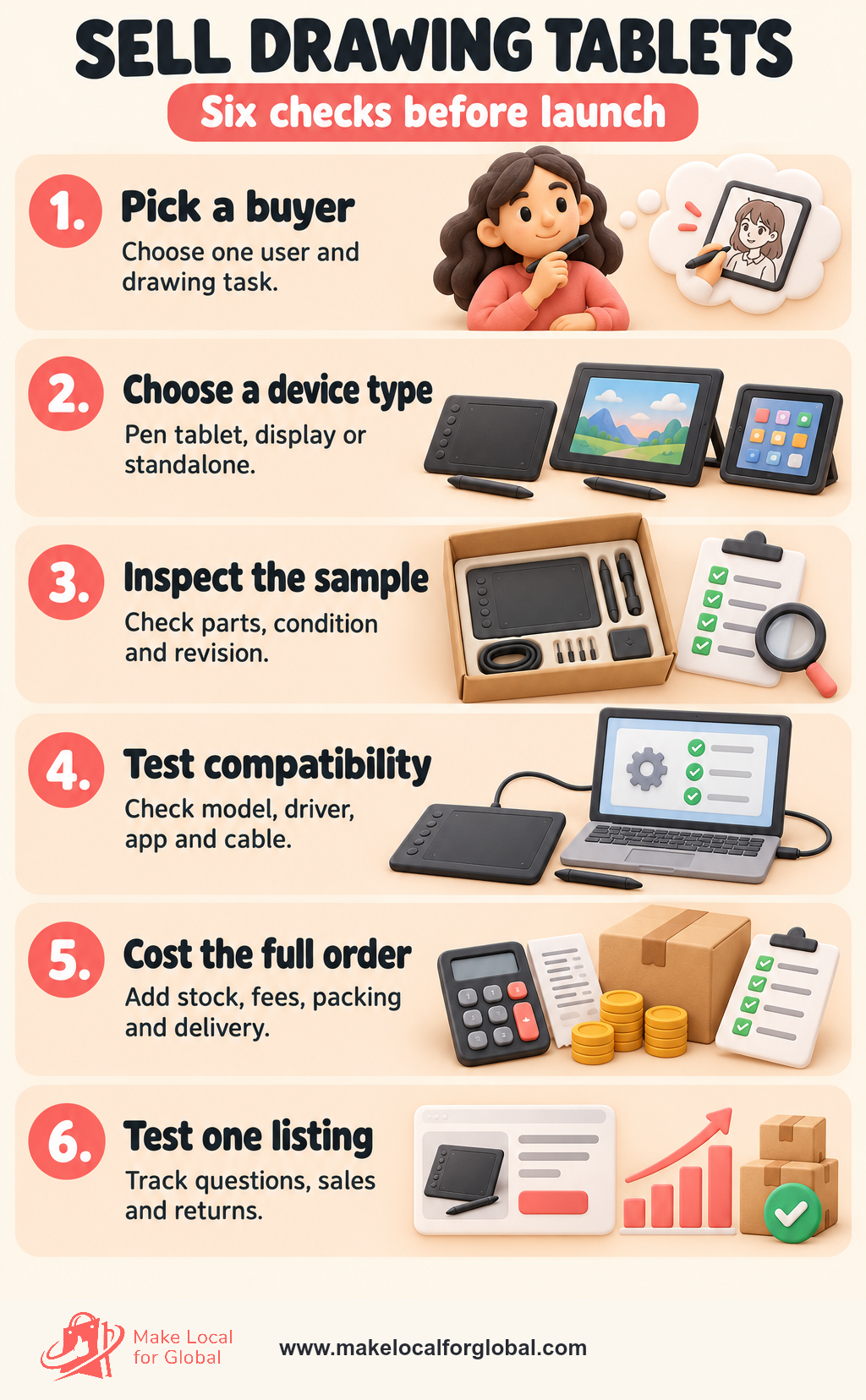
Use the vertical image below as a working checklist. Completion of a task proves a step happened; it does not prove future demand. Reorder only when the evidence fits your cash limit and support process.
After each order, note whether the customer asked a compatibility question, needed a driver, used an adapter, understood active area, wanted an accessory or returned the unit. One buyer does not prove a market pattern. Look for repeated signals across the same audience and model.
Ask an optional post-purchase question such as “Which computer and drawing app are you using?” or “Was any included item unclear on the page?” Do not collect unnecessary personal information. A support ticket may reveal a missing specification sooner than a star rating.
Set reorder rules before the first batch sells through. Consider lead time, current stock, actual sales rate and a buffer based on experience. A long lead time does not justify buying many units without demand evidence. If a model is discontinued, remove unsupported claims and tell customers which accessories still fit.
Choose one device type for one buyer, such as a compact pen tablet for a laptop user. Compare exact setup needs, sample quality, supplier records, delivery cost and support before adding a display or standalone device.
No. A pen tablet has no screen and maps to another display. A pen display includes a screen for pen input but may still need a computer. A standalone model runs its own operating system and apps. Use the maker’s category.
No. Support depends on model, operating system, driver, app, connection and sometimes graphics output or power. List maker-supported systems and link to model-specific support information.
No. They describe one specification. Drawing feel depends on device, driver, app and user. Quote the figure for the exact model and avoid turning it into a universal quality claim.
Include device, inbound freight, customs or handling where relevant, selling fees, packaging, delivery, returns or damage, advertising and order labour. Show the result as contribution before fixed overhead and tax, not net profit.
Request model and hardware revision, current specifications, supported systems, official driver, English instructions, conformity records where relevant, importer details, warranty process, spare parts, batch traceability and notice of product changes.
WEEE requirements apply to online and mail-order sales. Depending on the business, a seller may need free like-for-like take-back or Distributor Take Back Scheme membership. Check the current rules and explain your service to customers.
Only when the maker or app publisher supports the exact model and setup. State operating system and version checked, driver need and limits. A sample test does not prove future support for every update.
Make the product type clear, publish active area or screen size, show everything in the box, list exact compatibility, explain cable and driver needs, and show connector photos. Review questions and returns by model to find missing details.
Pick one buyer and tablet type. Compare suppliers, request current model records, test a sample on the systems you plan to name, then calculate the delivered order cost. Write a page that shows what is included and what must be connected or installed. Run a small test, record support and returns, then use those results to choose whether to reorder.
Use your sample results and first customer questions to improve the next version of your store. Explore website design or discuss the work with MLFG.
PREFERRED SOURCE
Like what you’re reading? Add Make Local for Global as a preferred source on Google to see more of our articles when you search.

Build your online presence without having to figure out everything yourself.