
Make Local for Global Logo

READY TO SELL Touchscreen monitors ONLINE?

Get a store built for you in 5 days, plus training and support to help you start, run, and grow your Alternative business.

Start Your Business Today: How to Sell Touchscreen Monitors Successfully

Discover how to sell touchscreen monitors in the UK market, find reliable suppliers, and build a straightforward online business without tech headaches.

Make Local for Global
How to Sell Touchscreen Monitors

Table of content

Touchscreen monitors are a great product to sell because they solve real problems: faster work, cleaner setups, and more intuitive control.

They’re also a category where buyers get stuck, because compatibility, ports, and use cases can feel like a tech maze.

If you want to sell touchscreen monitors online, your advantage is simple: make the choice clear, bundle the right accessories, and set expectations honestly so returns stay low.

Start with the real buying use cases

“Touchscreen monitor” isn’t one customer.

It’s several different buyers with different needs.

Why people buy touchscreen monitors

  • Point-of-sale (POS) and retail checkouts
  • Hospitality ordering systems
  • Home offices wanting faster workflows
  • Creative work: drawing, editing, on-screen controls
  • Education and training setups
  • Industrial and workshop use (gloves, dust, durability)
  • Kiosks and signage with interactive displays

Pick the use cases you want to serve, because each one needs different products and different support.

Choose a niche so your shop feels trustworthy

Touchscreen monitors are competitive.

Small sellers win by specialising.

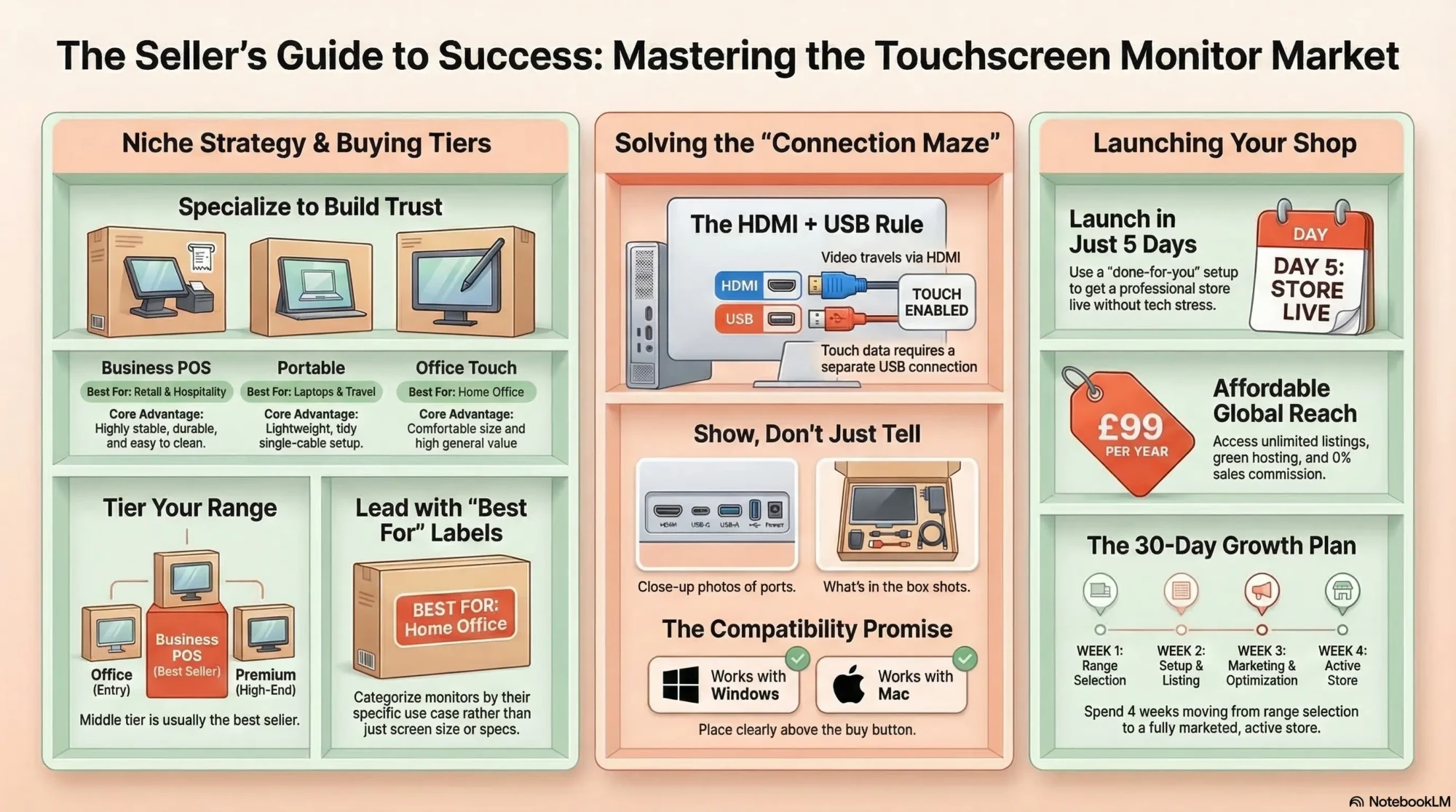
  • Business POS: reliable monitors, stable stands, easy connections.
  • Portable touch monitors: travel, hybrid work, laptop companions.
  • Creative touch: stylus support, colour clarity, better displays.
  • Education: simple, durable, easy to clean.
  • Industrial: tough builds, glove-friendly touch, mounting options.

Start with one lane, then expand once you understand support demands.

Tip: Your biggest sales lever is a simple compatibility promise: “Works with Windows out of the box”, “For Mac you’ll need…” and “Touch requires USB plus video.” Put that above the buy button.

Understand how touchscreen monitors actually connect

This is the number one confusion point.

Most buyers assume HDMI alone makes touch work.

It doesn’t.

Explain it in plain English

  • Video travels through HDMI, DisplayPort, or USB-C (depending on model).
  • Touch data usually travels through USB (USB-A to USB-B, or USB-C).
  • Some portable screens use a single USB-C cable for both video and touch – but only if the computer supports it.

Put this explanation on every product page and you will reduce returns immediately.

Common connection setups to support

  • HDMI for video + USB for touch (very common for desktops)
  • USB-C single-cable (common for laptops, but not universal)
  • DisplayPort for video + USB for touch (business setups)

Your shop should guide customers to the right cables and adapters as part of the purchase.

Build a touchscreen monitor range that’s easy to buy

Touchscreen monitors can be overwhelming if you stock too many similar models.

A curated range sells better.

Offer three tiers that match buyer needs

  • Everyday office touch: reliable touch, solid stand, good value.
  • Business POS: stable base, durable build, easy clean, strong warranty.
  • Premium / creative: better display quality, USB-C, stylus support where relevant.

Your middle tier will often be the best seller because it balances price and reliability.

Choose sizes that make sense

People buy touch monitors by space and use.

  • 13 – 16 inch: portable, laptop companion
  • 21 – 24 inch: desks, POS, general use
  • 27 inch+: kiosks, studios, bigger workspaces

Lead with “best for” labels rather than leaving buyers to decode inches.

Mounting and stands are part of the product

Many business buyers need specific mounting.

Be clear about:

  • VESA mount support
  • Stand adjustability
  • Tilt range for comfortable touch use

If a monitor is awkward to touch, it doesn’t matter how good the screen is.

Comparison table: touchscreen monitor types

TypeBest forProsCommon mistake to prevent
Portable USB-C touch monitorLaptops, travel, hybrid workLightweight, tidy setupAssuming all USB-C ports support video
Office touch monitorHome office and general useComfortable size, good valueNot plugging in the USB touch cable
POS touch monitorRetail and hospitalityStable, durable, easy to cleanIgnoring mount and stand requirements
Creative touch displayDesign work and on-screen controlsBetter display quality, stylus optionsAssuming it behaves like a drawing tablet

Price touchscreen monitors for profit (and fewer returns)

Touchscreen monitors can be return-heavy if you don’t manage expectations.

That means your pricing needs to cover support, warranty handling, and shipping risk.

What to include in your pricing

  • Product cost and margin
  • Shipping and packaging
  • Returns allowance (especially for “compatibility misunderstandings”)
  • Warranty support time
  • Payment fees

Don’t sell “mystery spec” monitors

If your listings are vague, buyers assume you’re hiding something.

Make specs clear and earn the price.

Create product pages that reduce support emails

Your product pages should answer the questions buyers always ask.

Especially the connection questions.

Touchscreen monitor product page checklist

  • Best for: POS, office, portable, creative
  • Size and resolution: plain and clear
  • Touch type: multi-touch, stylus support if applicable
  • Connections: HDMI/DP/USB-C and what each does
  • Touch requirement: “USB cable required for touch” in bold
  • Compatibility: Windows, Mac notes, Android if relevant
  • VESA support: yes/no and size
  • Included accessories: cables, power adapter, stand
  • Warranty: clear and visible
  • Delivery and returns: plain English

Photos and videos that sell touch monitors

  • Ports close-up with labels
  • “What’s in the box” flat lay showing cables
  • Video showing touch working in a simple demo
  • Angle shot showing stand tilt for touch ergonomics
  • In-use photo on a desk or checkout counter

In this category, “ports and cables” photos sell more than lifestyle shots.

Tip: Add a short “Will it work with my laptop?” section: list the three things to check (USB-C video support, HDMI plus USB available, operating system). It reduces pre-sale questions and returns.

Market touchscreen monitors with problem-solving content

Buyers search with very specific questions.

That’s good news: you can rank with genuinely helpful content.

Content ideas that sell touchscreen monitors

  • “Touchscreen monitor vs tablet: which is better for work?”
  • “How to connect a touchscreen monitor to a PC”
  • “HDMI vs USB-C for touchscreen monitors: what you need to know”
  • “Best touchscreen monitor for POS systems”
  • “Portable touchscreen monitors for laptops: what to check”
  • “Do touchscreen monitors work with Macs?”

Each topic leads naturally to your products and bundles.

Use search terms people type

  • Touchscreen monitor
  • Portable touchscreen monitor
  • Touchscreen monitor for POS
  • USB-C touchscreen monitor
  • How to connect touchscreen monitor
  • Does HDMI support touch

Use them naturally in headings and FAQs.

Set up an online shop without the tech headache

Touchscreen monitors sell best when the shop helps customers self-select the right product and accessories.

Compatibility tools and bundles matter.

What your shop must do well

  • Organise by use case: portable, office, POS, creative
  • Make connection requirements obvious
  • Offer correct cable and adapter bundles
  • Show warranty and returns clearly
  • Work smoothly on mobile

Done-for-you ecommerce setup can help you launch properly

If you’re selling tech products that require clear compatibility guidance, your site structure matters a lot.

Make Local for Global offers a done-for-you ecommerce setup that’s simple, affordable, and built for small sellers who want a professional store without wrestling with tech.

If you want help structuring categories and product pages, you can book a free consultation.

If you’re ready to get your shop live, you can Get your website for £99/year.

FAQ: selling touchscreen monitors online

Are touchscreen monitors worth selling online?

Yes, because demand is steady from businesses and home offices, but success depends on clear connection and compatibility guidance to prevent returns.

What touchscreen monitors sell best?

Office-sized touch monitors and portable USB-C touch monitors often sell best because they suit common use cases, while POS monitors can sell well when you provide clear mounting and compatibility information.

How do I reduce returns on touchscreen monitors?

Explain that touch usually requires a USB connection in addition to video, list included cables clearly, provide compatibility notes for Windows and Mac, and offer bundles with the right cables and adapters.

Do touchscreen monitors work with any computer?

Many work easily with Windows, but the exact setup depends on ports and operating system support, so the most responsible approach is to provide a clear “how to connect” guide and a compatibility checklist for each monitor.

Should I bundle cables and adapters?

Yes, because missing cables and wrong adapters are the biggest cause of “it doesn’t work” complaints, and bundles also increase order value in a way that feels genuinely helpful.

A practical 30-day plan to start selling touchscreen monitors

If you want to launch cleanly, build around compatibility clarity and a curated range.

Week 1: range and positioning

  • Pick one niche (portable, office, POS) and stock 6 – 12 core models
  • Create three tier labels: everyday, best value, premium
  • Define your cable and adapter bundles for each monitor type

Week 2: product pages and assets

  • Photograph ports, cables, and “what’s in the box” for every model
  • Write product pages using the checklist above
  • Create one “how to connect” guide with diagrams

Week 3: support and policies

  • Write plain-English warranty and returns pages
  • Create quick replies for common questions (USB-C support, Mac compatibility, adapters)
  • Test a few monitors to confirm your setup instructions are accurate

Week 4: marketing rhythm

  • Publish two guides: HDMI vs USB-C and how to connect touch
  • Create one landing page per use case (office, POS, portable)
  • Promote your best-value monitor bundle as the default choice

Touchscreen monitors sell when the buyer feels confident it’ll work with their setup.

Make connections idiot-proof, bundle the right cables, and your returns will stay low while sales climb.

PREFERRED SOURCE

Keep finding us on Google

Like what you’re reading? Add Make Local for Global as a preferred source on Google to see more of our articles when you search.

Newsletter Form in Blog

Sign up for our
FREE ecommerce newsletters!


By providing your email, you agree to our Privacy and Cookie Policy, as well as our Terms and Conditions.


DOWNLOAD FREE GUIDE
ebookmockup 1

How to sell Touchscreen monitors Online

Join 5,000+ others who downloaded
Blog to PDF Form
No spam, Unsubscribe any time.

Ready to Start Your Online Business?

Build your online presence without having to figure out everything yourself.

DOWNLOAD FREE GUIDE

How to sell Touchscreen monitors online

A simple plan to get your first steady online orders
ebookmockup 1
  • What to do first (so you don't waste time)
  • How to price and present your Touchscreen monitors
  • How to get traffic and turn it into orders
  • Join 5,000+ others who downloaded this
Blog to PDF Form
No spam, Unsubscribe any time.

Start Selling

Touchscreen monitors

Withing 5 days

You’ve read the guide. Now see if you qualify for a done-for-you online store for Touchscreen monitors sellers.
Find out if this is right for you in under 60 seconds.
  • No tech skills neeed
  • Store ready in 5 days
Qualifying / Questionnaire Form
  • Step 1
  • Step 2
  • Step 3
  • Step 4
  • Step 5

Answer a few quick questions and I’ll point you in the right direction.