

A checkout can appear to work and still leave a customer uncertain about the amount they will pay, which delivery option they have chosen, how to fix a mistake or what happens after they place the order. A careful test from a buyer’s point of view helps you find those gaps before they become support questions or abandoned orders.

This guide gives eight practical checks for a UK ecommerce checkout. It is an operational review, not a legal audit or a promise that changing one button will increase sales. Requirements can depend on what you sell and how you sell it, so use the official guidance linked below and seek qualified advice when you need an interpretation for your business.
Put your checkout through eight practical checks
The free Checkout Readiness Assessment helps you review totals, delivery, payment, corrections, accessibility and confirmation. It turns your answers into an evidence map and a focused next test.
Before you begin: make one realistic test order
Choose a product and delivery route that represent a normal customer order. If your store uses payment test mode, use it. If not, identify a safe way to verify the order without accidentally taking a real payment. Keep a short note of the date, device, browser, product, quantity, delivery location and payment method. The same scenario can be repeated after a site, theme or payment change.
Test both a phone-sized screen and a desktop view. Complete the journey as a visitor rather than relying on the settings panel: a shipping rule can be configured correctly but still be difficult to understand when it appears in the basket.
1. Check the total from product page to final review
Follow the amount as the order progresses. Compare the product page, basket, delivery step and final review. Record the product price, delivery charge, taxes shown and total at each point. If a charge changes, check whether the reason is clear before the customer commits.
The UK Competition and Markets Authority’s current price-transparency guidance says prices should be clear, complete and accurate, including charges customers cannot avoid. GOV.UK also says to provide the total price, or explain how it will be calculated, and the total delivery cost or how it will be calculated. The exact treatment can depend on the offer and charge, so consult the primary guidance rather than treating this checklist as legal advice. GOV.UK online-selling guidance and the CMA price-transparency summary are useful starting points.
For a practical check, add one ordinary item, then use a postcode that changes the delivery option if your store supports postcode-based rates. Note when each amount becomes visible. Do not assume that a price listed on a separate policy page will answer a question at the moment the customer needs to make a choice.
2. Put delivery choices, costs and timing together
Check whether customers can compare the available delivery methods, their costs and expected timing before the order is placed. Look for restrictions too, such as excluded postcodes, products that cannot be sent together or a different delivery promise for made-to-order items.
Try a second address or product type if your store handles them differently. The goal is to find out what the customer sees at the point of selection, not merely whether the shipping method exists in the admin settings. If the cost cannot be calculated until an address is entered, check that the checkout explains what is needed and updates the running total promptly.
3. Make payment methods and limits easy to discover
Review the customer journey for accepted payment methods and any restrictions. Check whether a customer can tell early enough that a preferred method is unavailable for a particular order, location or amount. Then run a test transaction or provider test mode for each enabled route, including a declined or interrupted payment if the provider offers a safe test scenario.
Record the exact wording shown when payment succeeds and when it fails. The message should explain what happened and what the customer can do next without implying that an order is confirmed when it is not.

4. Let customers review and correct an order
Before placing the order, check whether a customer can review the items, quantities, delivery choice and total together. Try changing a quantity, removing an item and selecting another delivery option. Does the summary update? Is it clear how to return to a previous step without losing information?
GOV.UK online-selling guidance says businesses must take reasonable steps to let customers correct errors in an order. Treat this as a prompt to test the actual correction route and consult the source for the full context. A useful test is to deliberately make a simple mistake, then note how many actions it takes to fix it and whether the updated total is obvious.
5. Make the final order action unambiguous
Read the final button and the information directly around it as if you were seeing the store for the first time. Could a customer tell whether the action places an order and creates a payment obligation? Is the full order summary still available immediately before the action?
Regulation 14 of the Consumer Contracts Regulations 2013 addresses distance contracts concluded electronically, including clear information immediately before ordering and a button label or equivalent wording that unambiguously indicates an obligation to pay. The regulation contains specific requirements and consequences; this summary is not a substitute for checking the text or obtaining legal advice. Test the exact wording in context instead of assuming that a generic “Continue” label is enough for every store.
Find the weakest part of your buying path
Use the assessment to compare the checks you have actually tested with the ones you still need to verify. You will get one focused next action rather than a conversion forecast.
6. Test fields, keyboard use and error recovery
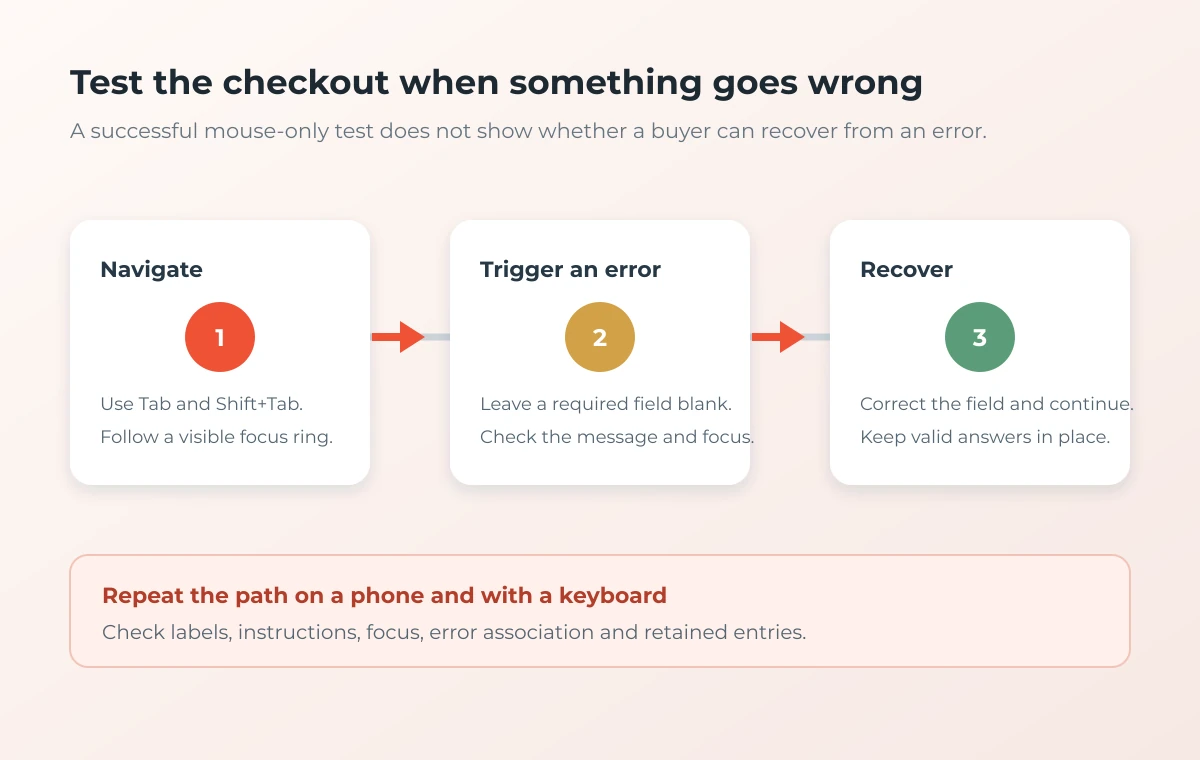
Try completing the checkout using only a keyboard. Move through the controls with Tab and Shift+Tab, check that focus is visible, and confirm that each field has a clear label. Then trigger a safe validation error, such as leaving a required field blank. Is the error easy to find and associated with the field that needs attention? Does the form keep valid details when the customer corrects the problem?
Repeat on a small screen. Look for labels that disappear when a field is filled, buttons that are hard to reach, messages that appear off-screen and layouts that require sideways scrolling. These checks do not replace a full accessibility audit, but they help reveal common barriers in the purchase path.
7. Check seller details and relevant order information
From the checkout, locate the business identity, a working contact route and the terms relevant to the purchase. Check that delivery, returns and any restrictions are easy to open on a phone and do not disappear when the order form is in use. If you sell subscriptions or digital content, review the information that applies to that specific offer rather than relying on a generic store-wide test.
GOV.UK lists information that online sellers may need to provide before an order, including contact details, product information, total price and delivery cost. Which details apply varies by situation. Keep the links current and make sure the information a customer needs is available at the stage when they are deciding.
8. Follow the order through to its confirmation
Complete the test order and inspect both the page shown after payment and the message sent to the customer. Check the order reference, items, amount, delivery expectation and next step. Confirm that the customer can keep a copy for future reference and can find a support route if something is wrong.
GOV.UK says sellers must confirm the contract as soon as possible and provide a copy in a format the customer can save. The details can vary by product and transaction, so use the official online and distance selling guidance to check your situation.
Keep a checkout test log
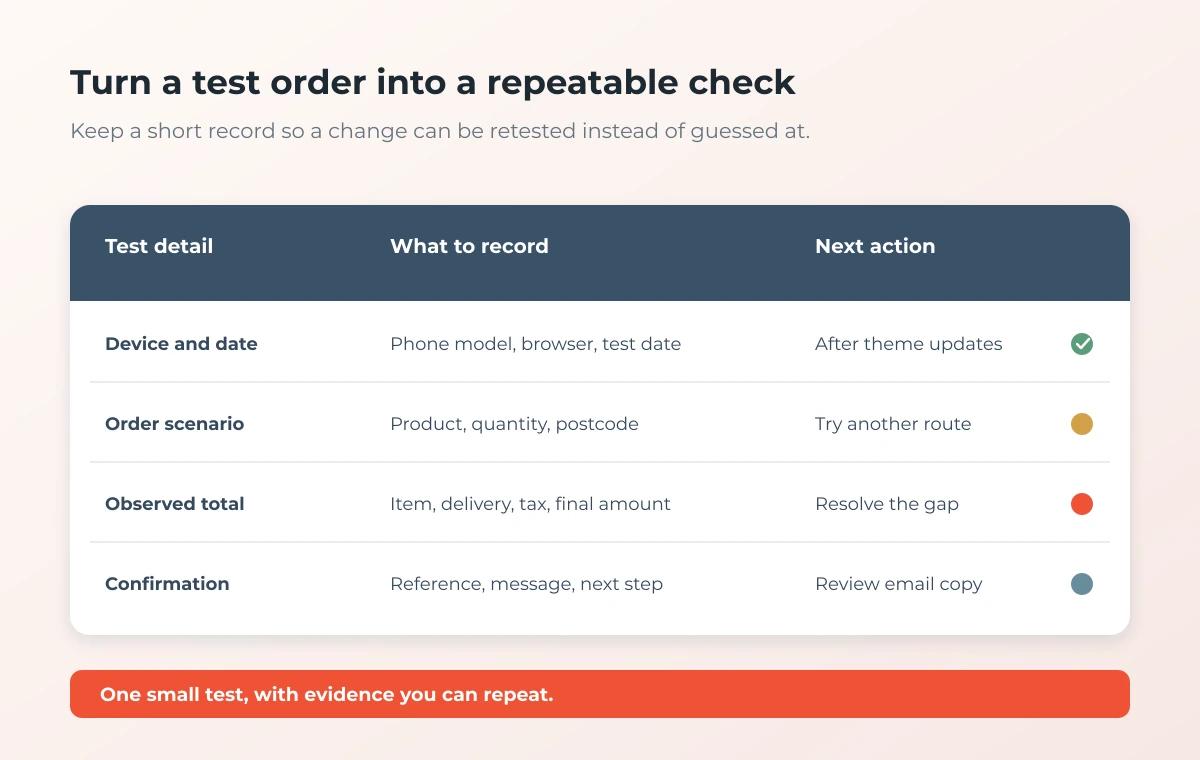
A simple record turns a one-off review into a routine. Note the test scenario, what you observed, the next action and who will check it. Do not record live payment details or unnecessary customer information in the log.
| Test detail | What to record | When to repeat |
|---|---|---|
| Device and date | Phone or desktop, browser and test date | After a theme, checkout or browser change |
| Order scenario | Product, quantity, postcode and delivery choice | When shipping rules or product mix changes |
| Amounts shown | Item, delivery, tax and final total at each step | After price, tax or delivery configuration changes |
| Confirmation | Order reference, message and customer next step | After payment or confirmation email updates |
What to prioritise after the review
Start with anything that could leave a buyer unsure about the amount due, the order they are placing or whether payment went through. Then prioritise issues that prevent a customer from completing a field or correcting a mistake. Assign one owner and a date to each next action, and repeat the same test after the change.
If you want to review more than the checkout, pair this process with the Online Store Trust Checklist for a broader look at customer-facing information across the store.
Frequently asked questions
How often should I test my ecommerce checkout?
Repeat a representative test after meaningful changes to your theme, payment methods, delivery rules, tax settings or order confirmation. A scheduled monthly check can also help smaller stores catch issues before a customer reports them.
Should I place a real payment to test the checkout?
Use payment-provider test mode where possible. If a real transaction is the only way to verify a specific path, plan how it will be refunded and recorded before proceeding. Do not put real card information into a test log.
Does this checklist prove that my checkout is legally compliant?
No. It is an operational checklist to help you observe the customer journey. Rules depend on the product, buyer and transaction. Read the linked official guidance and seek qualified legal advice for a compliance assessment.
What is the first checkout issue to fix?
Start with a point where the customer cannot confidently understand the order, total or next step. Then fix issues that block completion or error recovery, and rerun the same test to confirm the result.
Turn your observations into a practical next test
Answer eight short questions about the customer-facing checkout. The free assessment organises your evidence and creates a three-page PDF you can keep.
Need help applying your findings? Talk with MLFG.
Official guidance
- GOV.UK: Online selling
- GOV.UK: Online and distance selling
- The Consumer Contracts Regulations 2013, regulation 14
- Competition and Markets Authority: Providing clear and accurate information about prices
This article provides general operational information, not legal, tax or accessibility advice. Verify current official guidance for your products, customers and selling arrangements.