

Build a clearer ecommerce product catalogue with a practical template for product names, £ prices, variants, descriptions and image text.

An ecommerce product catalogue is the organised record behind your product pages. A useful ecommerce product catalogue template brings together the facts you need to create and maintain consistent listings: product names, prices, descriptions, identifiers, options and image information. It is not only a spreadsheet. It is a repeatable way to check that your product data agrees before you publish changes.
Start with one product and one trusted source record. Separate confirmed facts from details that still need checking, write customer-facing copy from evidence, then compare the finished listing with the record. This guide shows what to include, how to handle variants and how to keep product image descriptions useful.
Use the free Product Catalogue Builder to organise up to five product records, review gaps and prepare a downloadable brief.
A catalogue should make the important details easy to find and compare. Begin with fields that help you identify the product, explain it to a customer, price it correctly and fulfil the order. Add more fields when your range or platform needs them, rather than copying a huge generic template that nobody maintains.
| Field | What to record | Example |
|---|---|---|
| Product name | A clear, recognisable name used consistently. | Wool travel scarf |
| Category | The broad product group used for navigation and internal organisation. | Accessories |
| Customer price | The current selling price and any sale period, using your store currency. | £32.50 |
| SKU or product ID | A unique identifier that matches your stock or supplier system. | SCARF-WOOL-01 |
| Short description | A concise summary that explains what the product is and who it suits. | A lightweight wool scarf for everyday travel. |
| Variants | Each option and its own identifier, price or stock details where they differ. | Rust / Charcoal / Cream |
| Image information | Image file, view or purpose and concise alternative text where it conveys information. | Scarf folded beside its woven edge |
For example, a shop selling a scarf for £32.50 might keep the displayed price in one field, the SKU in another and a separate note for the supplier’s latest confirmed material details. This stops the price, stock code and product claims from becoming one hard-to-check block of text.
Product details often arrive through several routes: supplier sheets, packaging, purchase records, product samples and old store pages. Pick the most suitable source for each fact and record where it came from. If a supplier specification is out of date or a product sample does not match it, mark the discrepancy instead of guessing.
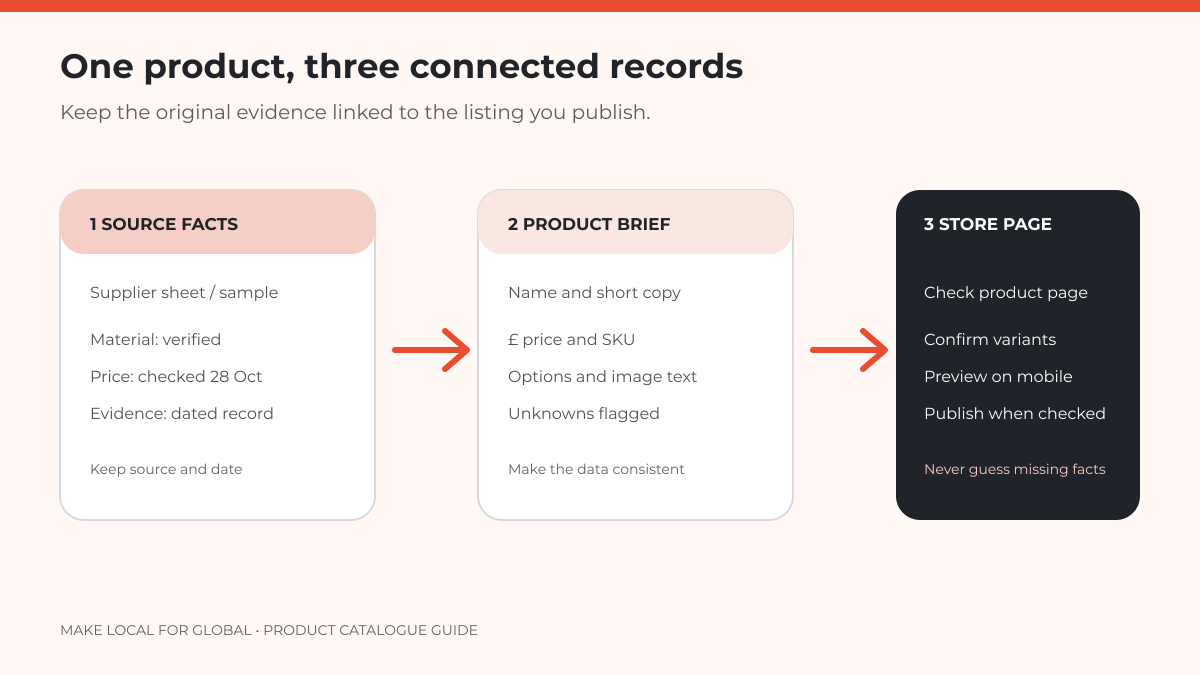
Separate the catalogue into three useful layers:
These layers connect, but they are not interchangeable. A supplier’s technical specification can support a factual listing claim, while a marketing phrase still needs to be accurate and understandable. Keep a source date or revision note for facts likely to change, such as price, stock and delivery estimates.
Lead with what the item is. Add the detail a buyer needs to distinguish it from similar products: material, dimensions, compatibility, care, pack quantity or intended use. Use plain language and remove claims you cannot verify. “Soft wool blend” needs evidence just as much as a claim about performance or sustainability.
Keep a short description short enough to scan, then place specifications and fuller explanation in the longer product description. WooCommerce separates product name, detailed description, product data, short description, image, categories and tags in its editor. It also treats variable products as options that can have their own SKU, price, stock and shipping settings. Your platform may use different field names, so adapt the catalogue to the system you actually run. (WooCommerce product editor settings)
Variants are choices within one product, such as size, colour or pack quantity. Record each option in a consistent order and give each sellable variation its own identifier when your stock system requires it. If price or availability differs by option, do not leave those differences buried in a description.

| Option | Variant SKU | Price | Check |
|---|---|---|---|
| Rust, one size | SCARF-RUST-OS | £32.50 | Confirm colour and stock record |
| Charcoal, one size | SCARF-CHAR-OS | £32.50 | Confirm SKU matches inventory |
| Cream, one size | SCARF-CREAM-OS | £34.00 | Confirm why this option costs more |
The sample prices above are illustrative. If the cream scarf costs more because it uses a different material, record the evidence and ensure the product page explains the difference. If the price difference is not intentional, correct the record before updating the listing.
Alternative text is not a keyword field. Describe the information or function the image adds for someone who cannot see it. A useful description might say “Rust wool scarf folded to show its woven edge” when that detail matters. An image that adds no information beside the same text may be decorative and should not receive a repetitive description.
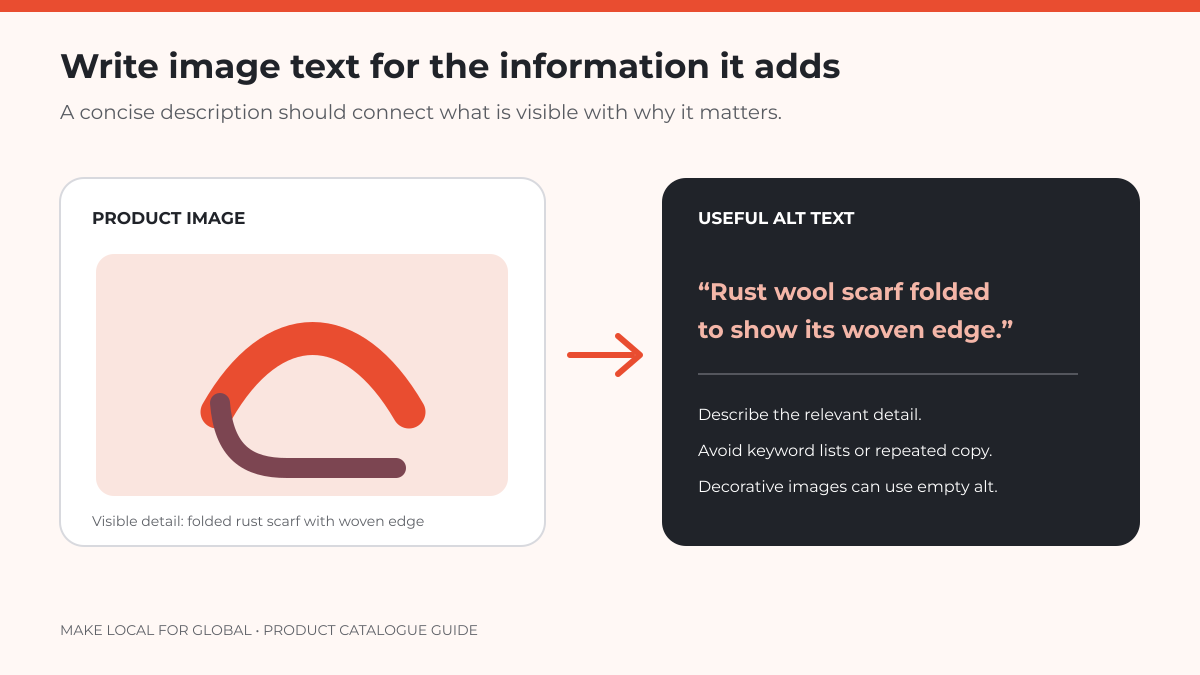
WooCommerce recommends descriptive alt text for product images and other informative visuals, and says not to leave it blank unless the image is decorative. The W3C Images Tutorial adds an important test: convey the image’s meaning, not necessarily a literal inventory of everything pictured. (WooCommerce accessibility tips; W3C guidance on informative images)
Compare names, £ prices, variants and image text in one reviewable brief. The builder flags details you may still need to confirm.
When costs or product mix need a separate review, use the right tool for that job. The product mix analysis guide looks at sales and contribution, while the packaging cost guide focuses on packing cost per order. A catalogue should organise product facts, not pretend to replace either analysis.
A catalogue is the organised set of product records and supporting facts. A listing is the customer-facing page or channel entry created from those records. One catalogue record may produce listings on a website, marketplace or printed document, each with different field requirements.
Yes. A spreadsheet can work well for a small range if fields are consistent, identifiers remain unique and the source of changing facts is clear. Use your ecommerce platform or product information system as the operational source when it is responsible for stock, variants and publishing.
It depends on how you track stock and fulfil orders. If each option is a separately stocked or picked item, a unique variation identifier usually makes the record easier to manage. Match the identifier format to your actual inventory process and platform.
Keep it concise and describe the information the image contributes. If the image’s details need a longer explanation, provide that explanation in nearby page text rather than forcing everything into the alternative text.
Consistent listings begin with clear product records. Start with a manageable group, verify the source facts, separate each variant and make image descriptions useful to customers. Then check the finished page before repeating the process across the rest of your range.
Prepare a concise catalogue brief for up to five products, then choose the next store-building step that suits your plans.
Want to talk through your next step? Contact MLFG. This guide is general educational information. Check your own platform, supplier records and applicable product requirements before updating listings.
PREFERRED SOURCE
Like what you’re reading? Add Make Local for Global as a preferred source on Google to see more of our articles when you search.




















Build your online presence without having to figure out everything yourself.