

When you sell several products, stock decisions compete for attention and cash. A useful weekly reorder review compares each product on the same basis: demand, usable inventory, confirmed supply, supplier lead time and the cost of a sensible replenishment quantity. This guide shows a simple way to prioritise that review without treating a spreadsheet or calculator as an automatic purchase instruction.
A reorder point is a trigger for review, not a promise that a supplier order is affordable or correct. The figures below are planning estimates. Check your stock records, customer commitments, supplier terms and cash position before deciding what to buy.
Compare stock urgency across your product range
The free planner puts up to four products into one review queue, showing usable stock, reorder triggers, estimated time to trigger and an illustrative case-pack order cost.
Why a multi-product stock review needs a consistent method
It is easy to focus on the SKU with the lowest on-hand count. That can be misleading. A product with 20 units and slow sales may have more cover than a product with 60 units and fast sales. A confirmed delivery can change the picture, while units already promised to customers should not be treated as free stock.
Review the same inputs for every product. That makes urgency comparable, while leaving the final buying decision with you. If a product has seasonal demand, a promotion, a new supplier or a one-off bulk order, mark that context rather than pretending the recent average is a reliable forecast.

1. Establish a comparable daily sales rate
Choose a representative period and divide units sold by the number of days in that period. For example, 90 units sold across 30 days gives an average of 3 units per day. Use the same method across products, but investigate whether the period was distorted by stockouts, a launch, a sale or an unusual seasonal peak.
Where the sales pattern changes sharply, a single average can hide risk. You might compare recent weeks with a longer baseline, or record a low, expected and high demand scenario separately. Keep the assumption visible so another person can understand what the rate means.
2. Calculate usable inventory position
Start with stock that is physically available, add confirmed incoming units, then subtract units already committed to customers or other obligations:
Inventory position = usable stock on hand + confirmed incoming units − committed units
Do not count a supplier quote or an unconfirmed purchase order as incoming stock. Check damaged, reserved, quarantined or otherwise unavailable units against your definition of usable stock. If your system reports stock differently, write down the adjustment so your weekly reviews stay consistent.
3. Set a reorder trigger for each product
A basic trigger combines expected demand during supplier lead time with an extra cover allowance:
Reorder trigger = average daily sales × (supplier lead-time days + extra cover days)
Round the result up to a whole unit. The extra cover is a deliberate buffer for uncertainty, not a universal fixed number. Choose it after reviewing demand variability, supplier reliability, delivery delays, the impact of a stockout and the cash tied up in additional stock.
This method is equivalent to adding safety stock to lead-time demand when the safety stock is expressed as days of average sales. The underlying logic is that the trigger should cover expected sales while replenishment is in transit, plus the buffer you choose. See Shopify’s reorder point formula guide for the standard demand, lead-time and safety-stock inputs.

4. Estimate how soon each product reaches its trigger
Compare inventory position with the reorder trigger. If stock is already at or below the trigger, mark the product for review now. Otherwise, estimate the days remaining:
Estimated days to trigger = (inventory position − reorder trigger) ÷ average daily sales
Round down to a whole day for a cautious review date. A product with no meaningful demand rate cannot use this calculation; investigate its sales history and whether the item is being retired or is temporarily unavailable before setting a new plan.
A simple queue might use three labels: review now when the trigger has been reached, review soon when it is expected within the next week, and monitor when it is further away. These are review timings, not automatic order priorities. A high-margin fast seller can matter, but so can cash constraints, storage limits, supplier minimums, shelf life and customer promises.
5. Estimate a quantity, then test the cash requirement
The review trigger answers when to look. It does not determine the right quantity by itself. One simple planning approach estimates target-cover demand and then rounds up to supplier constraints:
Illustrative quantity = the greater of supplier minimum and target-cover demand, rounded up to the case-pack increment
Target-cover demand is average daily sales multiplied by the number of cover days you want after the delivery arrives. A maximum-stock or min-max approach can also be useful when space, capital or storage life limits how much to hold. Shopify’s min-max inventory guide describes how a minimum trigger and a chosen replenishment quantity can form a maximum level.
Multiply the estimated units by your entered unit cost to create an illustrative cash figure. Confirm whether the unit cost includes freight, duty, VAT or other charges, and keep any omitted costs visible. A low unit price can still create an unmanageable purchase if a minimum order is large.
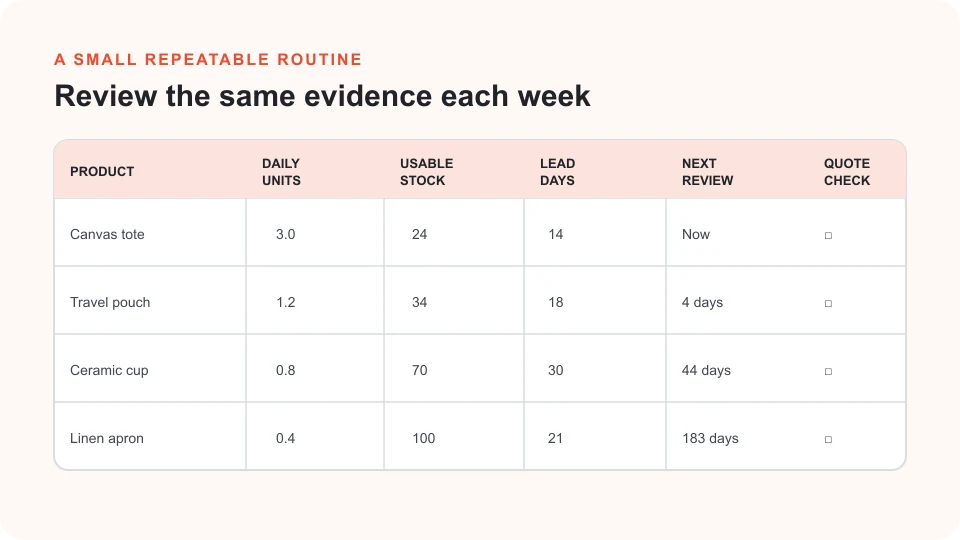
Worked example: prioritising four products
Assume a small UK store reviews four products each Monday. The numbers are illustrative and use average daily sales, confirmed supply and committed units. The displayed order cost uses the sample unit costs and case packs entered into the planner.
| Product | Position | Trigger | Review timing | Illustrative quantity | Illustrative cost |
|---|---|---|---|---|---|
| Canvas tote | 24 units | 57 units | At trigger | 90 units | £765.00 |
| Travel pouch | 38 units | 30 units | About 6 days | 60 units | £312.00 |
| Ceramic cup | 65 units | 32 units | About 41 days | 24 units | £288.00 |
| Linen apron | 88 units | 11 units | About 192 days | 30 units | £277.50 |
The canvas tote is already below its trigger, so it deserves the first review. The travel pouch is not yet at its trigger but is expected to reach it in around six days, so it is worth checking supplier timing and cash during the same review. The other two products can be monitored under these assumptions.
The example does not say to spend £1,077. It adds the estimated costs for the items marked now or soon. Before buying, validate the inputs, confirm the supplier quote and payment terms, consider demand changes, then check whether another use of that cash is more important.
Turn your stock data into a review queue
Compare up to four SKUs using sales, available stock, incoming supply, commitments, lead times, buffers and supplier minimums. Download a three-page PDF to keep the assumptions with your planning notes.
Make the review a repeatable routine
A useful review is a short operating habit, not a one-off spreadsheet exercise. Choose a regular day, update sales and stock inputs, check due and near-due products, and record what changed. When a supplier confirms a lead time or a shipment arrives, update the source record rather than relying on memory.
- Use the same sales period and definitions for usable, incoming and committed stock.
- Check the trigger assumptions when demand, product range or supplier performance changes.
- Confirm minimum order quantities, case packs, quote expiry, payment timing and delivery dates.
- Compare the order cash requirement with available working capital and other due commitments.
- Record why you chose to order, wait, reduce quantity or discontinue a product.
For record keeping, retain source documents such as supplier invoices, purchase orders, sales reports and delivery records in a way that supports your business bookkeeping. HMRC’s record-keeping guidance explains the records a self-employed business should keep.
Common multi-product reorder mistakes
- Sorting only by on-hand units: use demand and lead time as well as stock quantity.
- Counting all stock as available: separate usable units from customer commitments, damage and confirmed supply.
- Using one buffer for every item: justify the cover by product risk and cash impact.
- Ignoring order constraints: a minimum and case pack can make the estimated quantity larger than target demand.
- Treating an average as a forecast: promotions, seasonality and stockouts can make past rates misleading.
- Buying solely because a trigger was reached: verify the order, cash and supplier information first.
Frequently asked questions
How often should a small store review product reorders?
Set a cadence that fits sales volume, supplier lead times and the time needed to act. A weekly review may work for a small range, while fast-moving or long-lead-time products may need more frequent checks. Keep the schedule consistent and revisit it when conditions change.
Should I include incoming stock in inventory position?
Include only confirmed supply that you reasonably expect to receive. Record expected delivery dates and adjust if the supplier changes the commitment. Do not count an enquiry, quote or unconfirmed production slot as available inventory.
Does the reorder planner tell me what to buy?
No. It compares the values you enter, applies the stated assumptions and suggests an illustrative review quantity. It does not check live stock systems, supplier availability, taxes, cash, product expiry or demand forecasts. Verify those details before placing an order.
Plan your next product review with clearer inputs
Start with the product that needs attention first, then confirm the numbers and decide what fits your business.