

Use this final 48-hour checklist to test your Valentine’s code, prices, stock, delivery message, posts and ads. Then schedule a tidy store update for 15 February.


The final 48 hours of a Valentine’s campaign are for checking, communicating and making sensible adjustments. They are not the time to add a rushed discount, promise a delivery date you cannot meet or leave an expired message on the site.
Use this practical Valentine’s Day ecommerce checklist to check the offer, products, delivery information and campaign messages. The examples use a small UK gift shop, but the same checks work for many online stores.
Use MLFG’s free business apps to organise campaign details, product priorities and the website changes you may need.
Before checking buttons and graphics, write down what a customer has been told: what the offer includes, when it ends, which products are available and what delivery or collection options are realistic. Then compare that promise with the live store, current stock and the way you can fulfil orders today.
For example, a gift shop may show “Free delivery over £40” in the announcement bar, “15% off with LOVE15” on a product page and “Order by Tuesday for Valentine delivery” in an older email. Each statement can be individually clear, but together they can confuse shoppers if one has changed. Make one current source of truth and update every place that repeats it.
Do not stop when the code appears in the basket. Test it from a customer’s point of view, ideally on a phone and in a private browser window. Check that it applies to the intended products, calculates the right saving and does not combine with another offer unless you planned that.
Place a test order only if your payment setup supports a safe test method. Otherwise, check the checkout steps without completing a live purchase. Confirm the final total, shipping charge, tax treatment shown to the customer and payment options. If the offer is for selected items, make sure unrelated products do not receive the discount.

A practical example: if LOVE15 should apply only to a £28 candle and £18 card set, test each item alone and together. If free delivery begins at £40, verify how the basket behaves at £39.99 and £40.00. Small threshold or eligibility errors can lead to support messages and disappointed customers.
Review the products you are still promoting. Confirm the price, variant, size, colour, product photos and stock status. Remove a product from a featured row or change the link if it is sold out, delayed or no longer part of the campaign.
If only one colour or size remains, make that clear on the product page. Do not hide availability limits in a social caption while the page suggests the full range is ready to ship. For a bundle, check every component is available and that the price shown matches the bundle offer.

Delivery promises depend on more than the carrier’s transit estimate. Include the time needed to prepare, personalise, pack and hand over an order. Check your current dispatch workload, the collection schedule and any service notices before keeping a Valentine arrival message live.
Suppose a maker usually needs two working days to personalise a notebook, but has a queue of twelve orders. A carrier service that normally takes one day does not make “arrives tomorrow” a safe promise. Update the product page and campaign copy to explain the current estimate. Where appropriate, offer local collection, a digital product or a post-Valentine gift option, but only if that option genuinely exists.
Make the distinction clear between dispatch and delivery. “Orders placed by 1pm are usually dispatched the next working day” is not the same as “delivered next day”. Check that your wording matches the service you provide.
Open the store on a phone, not only in the desktop editor. Check that the hero message, announcement bar and featured products fit the screen and that buttons are easy to tap. The first click should take people to the Valentine collection, a gift guide or the specific product named in the message.
Read the page as someone unfamiliar with the campaign. Can they see what is included, whether a code is needed, when the offer ends and what delivery costs? If those answers are hidden beneath a large image or several pop-ups, simplify the page. Keep the product and terms visible before decorative campaign effects.

Review scheduled social posts, Stories, customer emails and paid adverts. Pause anything that features an unavailable product, an old coupon, an unrealistic delivery claim or an end date that has passed. Check the destination link as well as the caption: an ad for a gift bundle should not send shoppers to the homepage and leave them to find it.
A small shop might keep one post about its remaining ready-to-ship cards, update a Story with the current collection link and pause an advert for a personalised hamper once the maker’s order queue is full. That is more useful than continuing to repeat “order now for Valentine’s Day” everywhere.
Write down the date, time and time zone when the offer ends. Check your ecommerce platform’s settings, coupon expiry and any scheduled email or advert. If the offer ends at midnight, say which day and time zone you mean. Customers should not have to guess whether “ends Friday” means the start or the end of Friday.
Do not extend a promotion silently while old messages still state the previous end date. If you decide to extend it, verify that the new terms are accurate and update the website, email, social posts and paid campaigns together.
| When | Check | Example action |
|---|---|---|
| 48 hours before | Offer, code and basket total | Test LOVE15 on eligible products and confirm the delivery threshold. |
| 24 hours before | Stock, workload and delivery promise | Remove a personalised item if current capacity cannot meet the displayed estimate. |
| Campaign end | End time and outgoing messages | Pause the offer email and adverts at the stated time. |
| 15 February | Store clean-up | Remove expired banners, coupon references and date-specific delivery claims. |
Adapt the sequence to your store’s schedule and the campaign dates you have actually published.
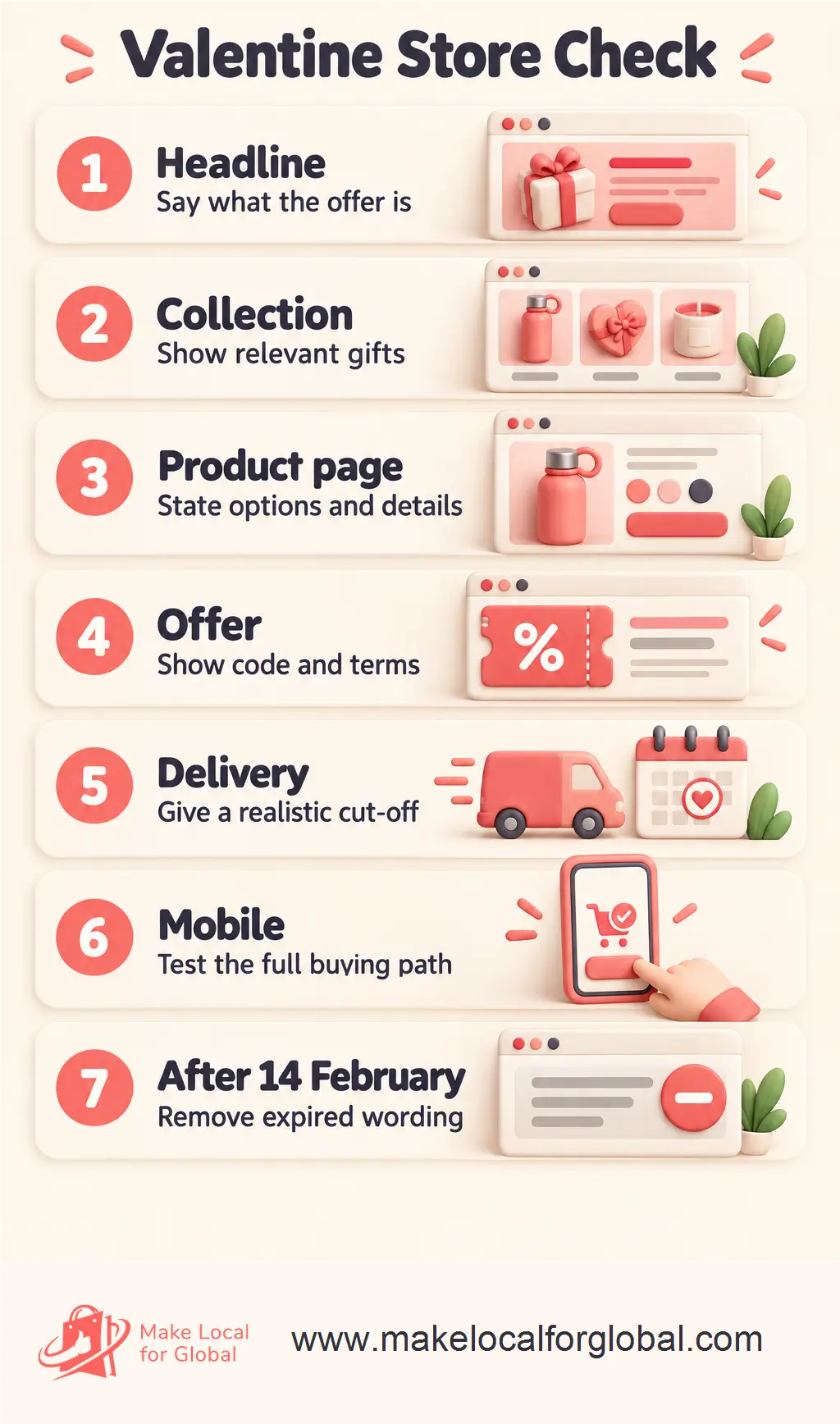
Make a short list of what should change after the campaign. Remove or replace the Valentine hero, announcement bar, expired code, gift badges and adverts. Update product descriptions that say “Valentine’s delivery” and move suitable products back into regular categories. Do not remove a good product simply because the occasion has passed.
For example, a heart-shaped mug might remain part of the everyday homeware range, while a banner saying “Order now for 14 February delivery” should not. Check the live site on desktop and mobile after the changes. A saved draft banner or cached page can leave old campaign copy visible longer than expected.
Rushing into a bigger discount can reduce the money left from each order without solving the real problem. A broken product link, unavailable size or unclear delivery estimate is often a more urgent fix. Check the customer journey before changing the offer.
Another mistake is to keep taking orders under a delivery promise that is no longer realistic. If the parcel may arrive after the occasion, say so plainly and offer only alternatives you can fulfil. Accurate information protects trust, even when it means changing the campaign message.
Before asking for campaign help, note the products, offer, code, end date and exact wording you want customers to see. Make Local for Global can discuss available ecommerce support with you.
Start with the offer and the fulfilment promise. Test the code and final basket total, then check that the featured products are available and that delivery wording matches your current capacity.
Not necessarily. Keep products that still suit your customers, but remove expired discounts, occasion-specific delivery promises and campaign banners. Move suitable items back into your regular collections.
Update the delivery information and campaign copy so customers can make an informed choice. You might promote local collection or suitable digital items if you offer them, but do not imply an arrival date you cannot support.
A final Valentine’s check is not about making a shop look busier. It is about keeping the offer, available products and delivery information in agreement, then removing time-sensitive messages when the campaign ends.
Tell MLFG what you sell and which store updates need attention. The team can discuss the support available for your business.
PREFERRED SOURCE
Like what you’re reading? Add Make Local for Global as a preferred source on Google to see more of our articles when you search.













Build your online presence without having to figure out everything yourself.