

Estimate how many customised orders your week can support. Learn a practical capacity formula that includes setup, customer admin, rework and a protected time buffer.


Custom orders take more time than the minutes spent making the item. You may need to check a spelling, prepare a proof, wait for approval, change a setting, inspect the finish and pack the order. If those steps are missing from your estimate, a busy week can quickly become an unrealistic promise.
Custom product production capacity is the number of orders you can complete within the work time you can genuinely protect. This guide shows a simple way to estimate it, include setup and rework, interpret the result and decide what to test next. The figures are planning assumptions, not a guarantee that every order or week will be identical.
Use your own production hours, customer admin and setup time to see how planned demand compares with protected capacity.
Capacity is not the largest number of items your machine or workbench could produce without stopping. For a made-to-order or personalised product, the order may also include customer messages, proof approval, preparation, finishing, quality checks, packing and dispatch administration. Some steps are active work. Others are waiting time that still affects the delivery date.
Separate the time you spend from the time an order waits. You might spend 8 minutes checking a request and making a proof, then wait two days for approval. The 8 minutes belongs in your labour estimate. The two days belongs in your lead-time plan. Mixing these measures can make both your capacity and delivery promise harder to understand.
Start with the hours you can allocate to customer orders in a normal week. Convert those hours to minutes, reserve a buffer for interruptions and variation, and subtract shared setup or cleanup. Divide what remains by the repeatable active minutes for one order. Round down because you cannot complete a fraction of a customer order.
Usable order minutes = weekly production minutes − protected buffer − weekly setup time.
Order capacity = usable order minutes ÷ active minutes per order, rounded down.
For a practical estimate, include customer admin in active order time and make your rework allowance visible. One simple method is to add a percentage of expected rework to the making and admin minutes. Keep setup as a weekly total when it happens once per week. If each product or batch has its own changeover, measure and allocate that setup consistently instead of subtracting it twice.

Suppose you can protect 12 production hours in a week. That is 720 minutes. You reserve 20% as a buffer for variation, or 144 minutes, then allow 45 minutes for weekly setup and cleanup. This leaves 531 minutes for orders. The 20% figure here is an example, not a recommended standard. Choose a buffer that reflects your own process and uncertainty.
Now suppose each order takes 22 minutes of making and finishing plus 8 minutes of customer admin. An 8% rework allowance adds 2.4 minutes, giving 32.4 minutes per order. Divide 531 by 32.4 and round down: the estimate is 16 orders within the protected limit.
| Capacity item | Calculation | Example |
|---|---|---|
| Weekly production time | 12 hours × 60 minutes | 720 minutes |
| Protected buffer | 720 × 20% | 144 minutes |
| Setup and cleanup | Measured once for the week | 45 minutes |
| Minutes left for orders | 720 − 144 − 45 | 531 minutes |
| Active time per order | 22 making + 8 admin + 2.4 rework | 32.4 minutes |
| Capacity estimate | 531 ÷ 32.4, rounded down | 16 orders |
If you plan 18 orders, they require 583.2 active minutes. That is 52.2 minutes, or about 0.87 hours, beyond the time left after setup and buffer. You could reduce the order plan, improve a repeatable step, or add hours that are genuinely available. Do not erase the buffer just to make the plan appear to fit.
Capacity also has a cost dimension. At a planning labour value of £14 per hour, 32.4 minutes represents £7.56 of time before materials, packaging, payment fees, delivery, tax treatment or overhead. It is an illustration of how time and price relate, not a suggested wage or selling price. For the broader cost model, read how to calculate labour cost for custom products.
A useful estimate comes from observing a real sample or a small batch. Record the same stages each time so that a slow proof process does not disappear inside a broad “production” average. Include errors and corrections, but note whether they were typical or unusual.

For each stage, write down the start and finish, active minutes, any waiting time, and whether the step is per order or shared across a batch. If setup takes 45 minutes for a batch of 15 items, it is not the same as 45 minutes for every individual order. Record the batch size and your allocation method so future estimates stay comparable.
A second review after a small batch is more useful than treating the first estimate as permanent. Compare actual minutes with your original assumptions, identify the stage with the largest difference and update that input. The personalised product order workflow guide can help you make the hand-offs and approval points clearer.
A result is a prompt for a decision, not a prediction. Compare the number of orders you plan to accept with the model’s order capacity and read the remaining-time figure alongside it. The app labels the estimate according to how much of the post-buffer order time your plan uses.
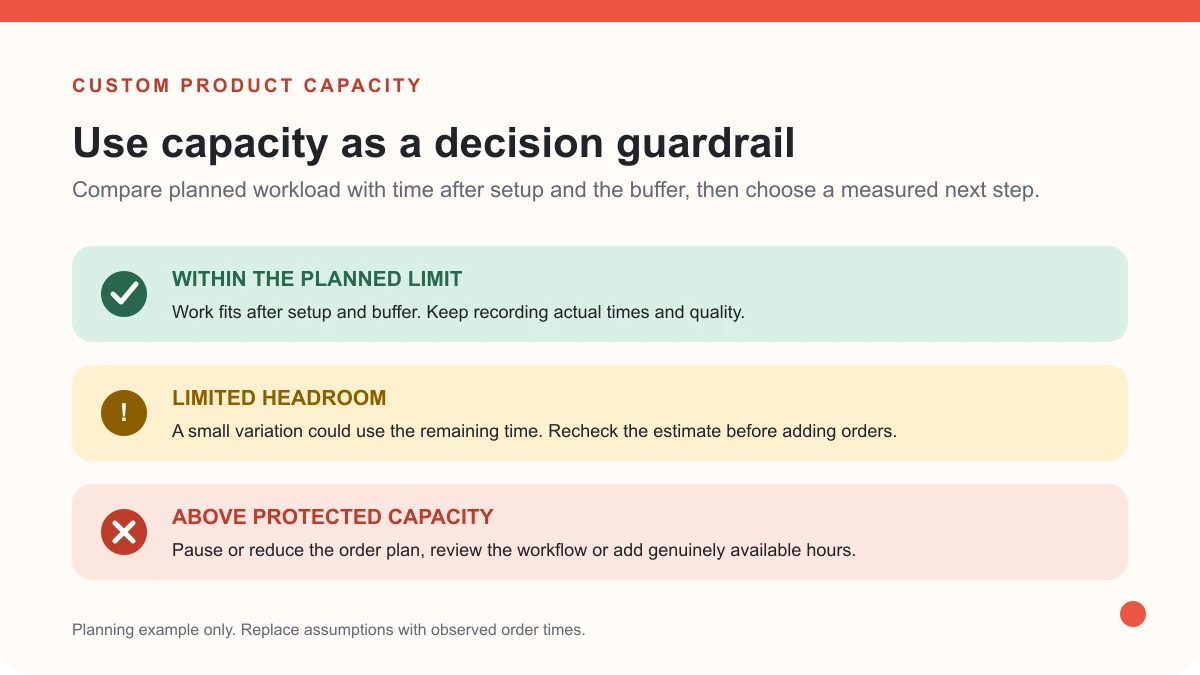
The planned work uses 75% or less of the minutes left for orders. The remaining time can absorb some variation, but it is not automatically spare labour. Check that other work, rest and customer service still fit around the plan.
The plan fits, but uses more than 75% of the available order minutes. A single correction, late approval or slower batch could use the remaining capacity. Review the delivery promise and consider a smaller order cap while you collect more timing data.
The planned workload is greater than the time left after setup and buffer. Reduce the number of orders, change the workflow, or add real production hours before taking on more work. Keep the buffer in the calculation so the comparison remains honest.
Change the order count or measured time in the Capacity Lab and see whether the result moves into a more workable band.
Use capacity to plan an order limit and a realistic dispatch window. It does not replace clear product details, approval deadlines or customer updates. Explain what the buyer must supply, when you will send a proof, when production begins and how you will handle a change or defect. Then keep the accepted specification with the order.
If you employ workers, plan their time with appropriate breaks and working-time rules in mind. GOV.UK explains that workers are usually entitled to an uninterrupted 20-minute rest break when they work more than six hours a day, with exceptions and different arrangements for some roles. Check the current GOV.UK rest-break guidance for the relevant worker type. The Health and Safety Executive’s demands standard also treats workload and work patterns as part of the work environment. This calculator is an operational planning aid, not employment or health and safety advice.
There is no universal number. It depends on the product, the customisation, active work per order, weekly setup, other commitments and how much time you protect for variation. Measure a real workflow and calculate a limit from hours you can genuinely allocate.
Count the active minutes spent preparing and checking the proof. Track the time waiting for approval separately because it affects lead time, not the minutes you personally spend making the item. Set an approval deadline if it helps customers understand how a delay affects the dispatch estimate.
There is no single percentage that suits every product or seller. Consider how variable your orders are, whether you rely on suppliers, how often you rework an item and what else can interrupt production. Start with a clearly labelled assumption, then compare it with actual weeks and update it.
No. Capacity estimates time and order volume from the inputs you provide. It does not prove demand or calculate every material, delivery, fee, tax or overhead cost. Review capacity alongside a complete cost model and buyer evidence before changing your offer.
Use the free app to compare planned orders with your measured making, admin, setup, rework and protected buffer. If you want help applying the result to your store, talk through your next step with MLFG.
PREFERRED SOURCE
Like what you’re reading? Add Make Local for Global as a preferred source on Google to see more of our articles when you search.



























Build your online presence without having to figure out everything yourself.