

Test one basket offer with a consistent average order value baseline, clear take-up tracking and a practical cost check.


An optional add-on or bundle can make a basket more useful, but a higher average order value does not automatically mean a healthier business. To test an offer properly, start with a consistent baseline, change one thing, record how many eligible orders take the offer, and check the extra costs as well as the sales.
This guide shows how to plan a small ecommerce basket test using pounds, a clear measurement window and a simple mug-and-tea example. The numbers are illustrations, not a sales forecast or a recommended price.
Compare a current average order value with one add-on, bundle or upgrade using your own monthly orders and offer take-up assumption.
Average order value, often shortened to AOV, is a chosen measure of order revenue divided by the number of orders counted. It helps you compare the typical value of orders over a defined period. It does not show what you keep after product costs, payment fees, fulfilment, refunds, tax or marketing.
There is not one universal report definition. Shopify, for example, documents an average order value in its marketing reports that includes taxes, shipping and discounts before returns, while its sales report calculates AOV from gross sales less discounts divided by orders, excluding post-order adjustments. Google Analytics 4’s item revenue metric is different again: it covers item price multiplied by quantity and excludes tax and shipping. Check the definition in the exact report you use before comparing periods or platforms. Shopify marketing report definitions, Shopify sales report definitions and Google Analytics 4 ecommerce purchase metrics explain these differences.
For your own test, write down the revenue basis, order count, date range, channel and treatment of discounts, delivery, tax and refunds. Use the same basis before and after. If the report or tracking setup changes, mark the date rather than treating the numbers as directly comparable.
A good first offer has a clear reason to sit beside the core product. It might help the buyer use, maintain, gift or personalise what they are already buying. A mug with a matching tea tin is easier to understand than a mug paired with an unrelated desk accessory. Keep the main item complete on its own unless the extra component is genuinely necessary.

Before changing your product page, answer four practical questions:
Choose a recent period that reflects normal trading, then record the number of orders and the AOV from one named report. Use dates long enough to cover the way your shop is normally visited and purchased from, but do not mix a quiet weekday-only baseline with a promotion weekend unless that is the comparison you intend to make.
Decide which orders are eligible to see the offer. If it appears on every qualifying product page, the take-up denominator should be eligible orders exposed to it, not every order on the website. If only one product page is included, keep the baseline and result focused on that same product or audience where your data allows.
Keep a short test record: offer wording, price, eligible product, start and end dates, audience, channel, stock position, changes made and the report used. Do not change the discount, page layout, shipping threshold and traffic source at the same time. If more than one change is made, you will not know which one affected the result.
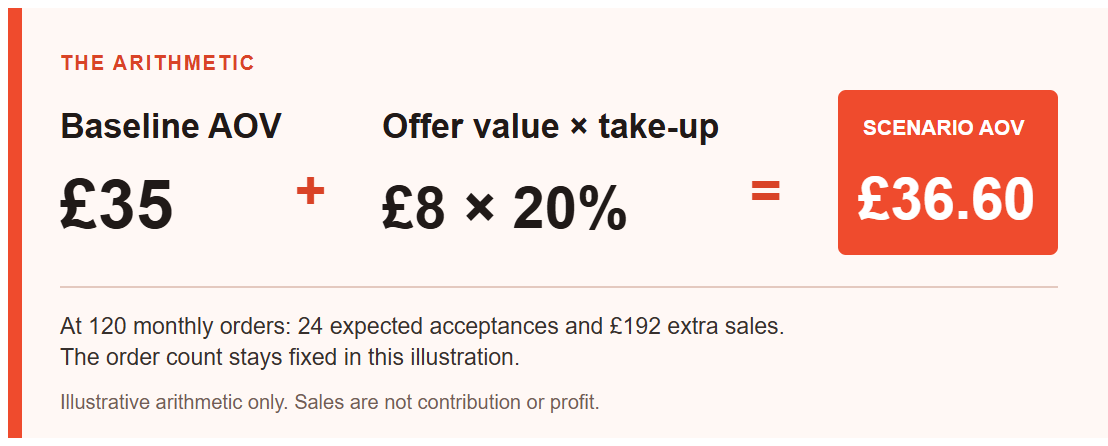
Suppose your chosen report shows a £35 average order value. An optional tea tin adds £8 to an order when accepted, after any bundle saving. If 20% of eligible orders take it, the simple scenario is:
Scenario AOV = £35 baseline + (£8 extra order value × 20% take-up) = £36.60.
With 120 eligible monthly orders, the arithmetic gives 24 expected offer acceptances and £192 extra sales at the same order count. It does not predict that 24 people will accept the offer.
The calculation is useful for planning a test, not for claiming an outcome. After the offer runs, replace the assumption with observed orders and actual revenue from the same report basis. Compare like with like and note unusual events such as a sale, influencer mention, stockout, site change or email campaign.
| Offer take-up assumption | Expected acceptances from 120 orders | Scenario AOV | Extra monthly sales at unchanged orders |
|---|---|---|---|
| 10% | 12 | £35.80 | £96 |
| 20% | 24 | £36.60 | £192 |
| 30% | 36 | £37.40 | £288 |
These figures are calculated examples, not a target or benchmark. The table holds order count at 120 and extra value at £8. If either changes, recalculate the whole scenario.
Track a small set of measures with clear definitions. Start with how many eligible orders saw the offer, how many accepted it and how many completed. Then review AOV using the same sales report, and examine the contribution left after the costs that changed because of the offer.

If you use GA4, confirm that ecommerce tracking is actually sending the events you rely on. Google’s documentation says ecommerce activity is not collected automatically as ecommerce data; events such as add_to_cart and purchase need to be sent with the required parameters to appear in the ecommerce reports. Use DebugView or your analytics implementation checks before you rely on the numbers. Google’s GA4 ecommerce measurement guide describes the event and item information.
Enter your own baseline, offer value and take-up assumption. Keep order volume fixed in the model, then compare the scenario with actual results after your test.
A higher AOV can be a useful signal, but it is only one part of the decision. Ask whether more eligible buyers accepted the offer, whether total completed orders changed, and whether the added products left enough contribution after their costs. Watch returns, cancellations, delivery issues and customer questions too. A confusing offer can raise the basket total for some orders while making the buying decision harder for others.
For an add-on, include its unit cost and any extra pick-and-pack time. For a discounted bundle, calculate the saving from the separate prices and see what remains after the combined costs. For an upgrade that replaces an item, use the price difference as the extra value, not the full upgrade price. Do not count sales revenue as profit.
Check your inventory rules if the same component sells on its own and in a bundle. Make sure one sale reduces the shared stock count correctly. Keep the product page explicit about what is included, which options are available, when the order will dispatch and what delivery costs apply.
There is no single good AOV for every shop. Product price, customer, channel, delivery policy, tax treatment and order mix all affect the number. Compare your own consistent periods and business goals rather than adopting an unrelated benchmark.
No. AOV is an average order revenue measure. An offer can add sales and still reduce contribution if the discount, product, packaging, delivery or handling costs are too high. Review the incremental costs and any effect on completed orders.
There is no universal order count that proves an offer works. Small samples can swing because of a few orders, and a shop’s traffic and order mix can change over time. Record the sample size and treat early results as a learning signal, not certainty. If the decision carries meaningful cost or stock risk, plan a longer or better-controlled test.
Use the format that is easiest for the buyer to understand and for you to fulfil. A fixed bundle suits a ready-made set with a clear shared use. An optional add-on suits buyers who may want one extra item. An upgrade should show what changes and the additional price. Test one format first.
Use our guide to planning your first 100 ecommerce orders to connect order value with traffic, conversion and fulfilment. If you still need to check what remains after costs, see how to price your product without guessing.
A useful basket test starts small. Choose a relevant offer, make every term clear, measure the same order journey and check what the added work and costs leave behind. The result might be to keep the offer, change the presentation, test a different item or decide that the core product is already the clearest choice.
Compare one offer scenario in the free lab, then check the costs and evidence in your store reports before making a wider change.
Want to talk through your store plan? Contact Make Local for Global.
This article is general educational information, not accounting, tax, legal or financial advice. Confirm the definitions and data in your own ecommerce and analytics tools before making commercial decisions.
PREFERRED SOURCE
Like what you’re reading? Add Make Local for Global as a preferred source on Google to see more of our articles when you search.




















Build your online presence without having to figure out everything yourself.