

When an Amazon affiliate article receives visits but produces few product clicks, the useful question is not simply “How much traffic do I need?” It is “Can a reader see a relevant next step, and what does the evidence say after they click?” A small, careful link test can reveal more than changing several page elements at once.
This guide explains how to measure the path from a content page to a product link, distinguish your own page metrics from Amazon report definitions, and run a focused test. It is about improving the clarity and usefulness of a page, not promising sales or commission.
Map your current traffic assumptions
Use the free lab to enter your own visits, link click rate, order assumptions and commission rate, then compare one change at a time.
Start with a clear measurement path
Affiliate reporting combines several stages that are easy to blur together. Record each stage separately so you can see where the evidence changes.

- Article visits: how many visits or sessions reached the page, using one consistent analytics definition.
- Product link clicks: outbound clicks recorded by your website analytics or Amazon reporting.
- Items ordered: orders attributed in the affiliate report. This is a report outcome, not a guaranteed conversion.
- Items dispatched: items that have shipped and may qualify for a fee under the programme rules. Orders can later be cancelled, returned or otherwise adjusted.
There is an important terminology trap. Amazon Associates defines click-through rate using link clicks divided by link impressions. That is not automatically the same as product link clicks divided by article sessions. For your page test, give the second measure a clear name such as page-to-link click rate and document its denominator. In Amazon reports, use the platform’s own label and definition.
A simple page-to-link click rate is:
Page-to-link click rate = tracked product-link clicks ÷ article visits × 100
If a guide has 1,500 visits and its product links receive 60 clicks, the page-to-link click rate is 4% for that measurement window. This tells you about the page and its path to the link. It does not tell you what proportion of those visitors bought anything.
Make the link useful to the reader
A product link should help someone make a decision they are already considering. Before testing its placement, check that the surrounding text explains why the product is relevant, what the reader should compare and what the link opens. A button that says “Buy now” can be less useful than a specific, accurate label such as “Check current sizes and availability”.
Review the page from the buyer’s point of view:
- Does the article answer the question that brought the reader there?
- Is the product recommendation supported by a stated use case or comparison?
- Can a reader distinguish editorial advice from an affiliate link?
- Does the link label explain what happens next, including that availability and price may change?
- Does the page work on a narrow screen, with readable text and a comfortable tap target?
Affiliate relationships should be disclosed clearly. The Advertising Standards Authority explains that affiliate marketing may count as advertising and should be recognisable as such. Place a plain disclosure where readers can notice it before or when they encounter the link, and check the current rules for the channels you use. This guide is practical information, not legal advice.
Choose one test that matches the evidence
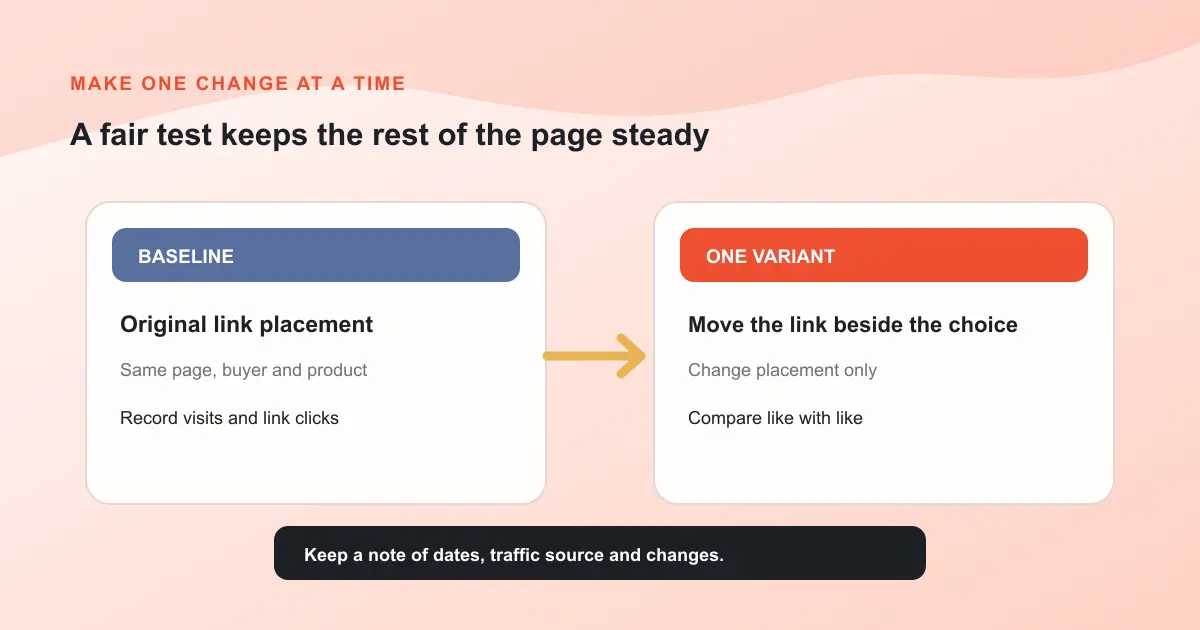
Do not begin by changing the headline, recommendation, link colour and page layout together. If the result changes, you will not know which adjustment mattered. First inspect the page and reports, then make one focused change while keeping the audience, product and measurement period as comparable as possible.
Evidence check: A short test with very few visits or clicks can swing sharply from one order. Record the sample size and treat early differences as a reason to investigate, not proof of a lasting improvement.
Examples of focused tests include:
- Move one relevant link from the end of a long explanation to the point where the product first solves the reader’s stated problem.
- Replace a vague link label with a descriptive one that sets an accurate expectation.
- Add a concise comparison of two product attributes before the same existing link.
- Remove a repeated link that interrupts the explanation, while keeping one clear link in the most helpful location.
Keep the content accurate and avoid creating artificial urgency. A good test improves the reader’s ability to evaluate a product. Do not claim that a change caused more orders when the reporting period, traffic mix or other page changes could explain the difference.
Read clicks and orders as separate signals
A page can earn more link clicks without producing more qualifying orders. That may happen because the reader is still comparing options, the product page is not a good match, or a report has not finished updating. Conversely, a small number of relevant clicks may lead to a useful order signal without a large change in page click rate.
Amazon’s own reports distinguish clicks, ordered items and dispatched items. Its programme explains that qualifying fees are associated with items that meet the rules and are dispatched; the report can therefore change after an initial order. Check the reporting definitions and attribution rules in your account rather than treating an immediate order count as final.
Separate the questions:
- Did the page help readers notice the link? Review page visits and tracked link clicks.
- Did the link reach a relevant product page? Check the destination and product match.
- Did the affiliate report show orders or dispatched items? Use the report’s own dates and definitions.
- Did the change remain useful to the reader? Re-read the page and check for clarity, disclosure and mobile usability.
Compare a link test with your own inputs
The lab keeps traffic, link clicks, qualifying-order assumptions, basket value, effective fee and reversals visible so you can see which assumption drives the scenario.
Use a simple worked scenario carefully
Suppose an article records 5,000 visits in a month. For an illustrative planning scenario, assume 4% of those visits produce a product-link click, 3% of clicks produce an item ordered, the average basket is £42, the assumed effective fee rate is 3.2%, and 10% of the fee estimate is held back for reversals. These are made-up planning inputs, not current Amazon rates or a forecast.
The steps are:
- 5,000 visits × 4% = 200 modelled link clicks.
- 200 clicks × 3% = 6 modelled qualifying orders.
- 6 orders × £42 = £252 in assumed basket value.
- £252 × 3.2% × 90% after the assumed reversal allowance = £7.26 estimated commission.
The result changes if any input changes. The app uses fractional expected values in its comparisons, even though actual orders are whole items. Actual affiliate fees depend on the applicable programme rules, category, dispatch, customer activity, exclusions and adjustments. Use your account’s current reporting and fee schedule for real decisions.
| Input or result | Illustrative value | What to verify |
|---|---|---|
| Monthly article visits | 5,000 | Use one analytics definition and date window. |
| Page-to-link click rate | 4% | Divide tracked product-link clicks by visits, not by link impressions. |
| Qualifying order assumption | 3% of clicks | Compare it with the matching affiliate report and period. |
| Average basket and effective fee | £42 and 3.2% | These are examples only. Enter your own observed values and current programme terms. |
| Estimated fee after reversal allowance | £7.26 | It is a model output, not a guaranteed payment or accounting record. |
Keep a short evidence log
A basic log can stop you drawing conclusions from memory. Track page visits, link clicks and affiliate report outcomes separately, alongside the exact change and dates. Use the same page, link and reporting window when comparing a baseline with a variant.

Amazon reporting may attribute activity according to programme-specific rules and reporting windows. Keep your own page analytics time zone and the affiliate account’s reporting dates in mind when comparing totals. If the numbers do not line up exactly, do not silently force them to match. Note the definitions and timing instead.
For a broader traffic-to-income scenario, see our guide to estimating Amazon affiliate earnings from traffic in the UK. Before launch, use the Amazon affiliate website checklist to review essential pages and disclosure, and read the merchant dependency guide to consider concentration and programme risk.
Common mistakes to avoid
- Mixing up denominators: a page-to-link rate based on visits is not Amazon’s reported CTR based on link impressions.
- Calling an order a final commission: distinguish ordered items from dispatched items and later adjustments.
- Changing too many things: isolate a single meaningful page change where possible.
- Ignoring the buyer’s reason for clicking: a link is not useful if its destination or product does not fit the surrounding advice.
- Using a percentage as a promise: rates vary by site, audience, category, product, time period and current programme rules.
- Hiding the commercial relationship: make affiliate disclosures clear and easy to notice.
Frequently asked questions
What is a good Amazon affiliate click-through rate?
There is no universal target that proves a page is successful. First define the measure. Amazon’s reported CTR uses clicks divided by link impressions. Your page-to-link click rate can use clicks divided by article visits, but label that measure clearly and compare like with like across your own pages.
Why do Amazon clicks and orders differ?
A click records a link interaction, while an order is a later report event. Visitors may compare products or leave without ordering. Reporting dates, attribution and programme eligibility also affect what appears. Check the current Associates reports and rules for exact definitions.
Does a higher link click rate mean more commission?
Not necessarily. More clicks do not guarantee relevant product views, qualifying orders, dispatch or commission. Treat clicks as one diagnostic signal and review subsequent report outcomes separately.
How many visits do I need for a reliable test?
There is no single threshold that fits every page. Record the number of visits and clicks, avoid reading too much into tiny samples, and repeat a useful change over a suitable period. The simulator can compare assumptions, but it does not calculate statistical confidence or guarantee a result.
Can I change an affiliate link label?
You can improve clarity, but preserve accurate product information and follow the programme’s current link, disclosure and promotional rules. Make sure readers know that the link leads to a retailer and that prices or availability may change.
A practical next step
Choose one page with a clear buyer question. Save its current date range, visits, product-link clicks and affiliate report outcomes. Then make one reader-focused change, note the date and check the same measures again. Keep the disclosure visible, use current programme information and treat the result as evidence for your next decision, not a promise about future income.
Turn your page evidence into a next test
Use the free lab to compare a baseline with one click-rate or order-rate change. If you need a broader store setup, review the MLFG plan and decide whether it fits your next step.
For help choosing a route, contact MLFG and explain what you are building.
This educational guide and simulator use assumptions supplied by the reader. They are not a forecast, financial or legal advice, or a guarantee of business results. Always check current Amazon Associates terms, report definitions and advertising guidance.