

Plan a Christmas ecommerce campaign with a focused product range, a clear offer, realistic dates and a practical transition into Boxing Day and New Year.


Christmas sales start long before December.
A small shop does not need a huge range or a month of complicated offers.
It needs a clear plan: who the products are for, what to feature, what the offer costs, and when each message should change.
This plan helps a new ecommerce owner turn those choices into a campaign they can manage. The examples use a fictional homeware shop selling mugs, candles and tea towels.
Treat every price and date below as an illustration, then replace it with your own figures, supplier lead times and customer demand.
Make a list of the products, offer and dates you want customers to see. MLFG can help you plan the store setup around that request.
Pick one main result before choosing a discount or making new graphics.
A single goal makes it easier to choose products, write messages and judge whether the campaign worked.
Choose a goal that fits your stock and capacity.
For example, if a maker can pack 20 orders a day, a campaign built around 100 orders arriving overnight could create late dispatches.
A target of 30 orders across one week may be easier to handle and learn from.
Open your catalogue and make a short list. Look for items that already have decent photos, a clear description, stock you can replenish, and a reason someone might give them as a present.
Do not start by adding new products just to make the site look festive.
Use your own order history, stock records and customer questions.
A candle that sold steadily in autumn may suit a home-loving recipient.
A mug that has sat untouched for six months will not suddenly become a bestseller through a seasonal product photo.

Sort likely products into three groups: proven sellers, good gift options that need clearer presentation, and items to leave out.
Add one price entry, one mid-range choice and, if it suits your shop, one higher-priced set.
A shop selling handmade notebooks might feature a £9 pocket pad, a £22 journal set and a £38 boxed writing kit.
A customer shopping for a work colleague may be looking for something small, easy to post and under £20.
Someone buying for a parent may want a larger gift with more personal detail.
A pet owner may value a practical item for their dog more than a generic Christmas design.
Choose two or three audiences your current range can serve. For the fictional homeware shop, that might be: gifts for tea drinkers, small gifts for colleagues, and cosy home sets.
If a product does not fit one of those groups, it does not need a place in the campaign.
A Christmas campaign can use a coupon, a bundle, a free-delivery threshold, a small gift with purchase or a selected-product price.
A discount is just one choice.
Match the offer to how people buy from your shop and check the money left after costs.
For example: a candle sells for £24. The candle, packaging, payment fee and delivery allowance total £15. If a 10% coupon reduces the selling price by £2.40, £6.60 remains before overheads, tax and the owner’s labour. The owner should decide whether that contribution is enough before publishing the code.
A £30 mug-and-tea-towel set may work better than reducing every item. If the two items normally cost £18 and £16, a £30 set gives the buyer one gift decision and a £4 saving.
Check packing time, separate delivery costs and whether stock levels can support the set.

For a fuller comparison of coupons, bundles and free-delivery offers, link to Christmas promotion ideas for ecommerce stores.
For bundles across different shop types, see Christmas bundle ideas.
If you are unsure which products belong together, start with the customer and the order they want to place. MLFG’s free Ecommerce PathFinder can help you think through your next store step.
A campaign date is more than the first day a banner appears.
Work backwards from the last date you can responsibly promote Christmas delivery.
Include time for product preparation, supplier dispatch, carrier transit and a buffer for delays.
Check the dates with the supplier or carrier you actually use before making a promise.
| Stage | Example timing | What to prepare |
|---|---|---|
| Plan and check stock | October | Choose products, audience, stock limit and offer. |
| Campaign opens | Early November | Publish collection pages, email and first social posts. |
| Gift ideas and reminders | Late November to early December | Show bundles, price groups and customer favourites. |
| Delivery cut-off | Set from real fulfilment data | Update product pages and stop unsupported delivery claims. |
| Post-Christmas | 26 December onward | Change Christmas messages to Boxing Day or New Year offers. |
Dates are planning examples, not delivery promises. Confirm current supplier and carrier estimates for each destination.
Give each task an owner.
For a sole trader, you will own those tasks. A sole trader might spend Monday confirming stock, Wednesday checking mobile pages, and Friday scheduling a customer email.
Small calendar blocks are easier to complete than one vague task called “Christmas marketing”.

The season can move from Christmas gifts to Boxing Day offers, then to New Year products.
A useful plan says what changes, not just what starts. Write down the date when each banner, coupon, collection and email stops.
For example, on 26 December a homeware shop could replace “Gifts for cosy evenings” with “Refresh your living room for January”.
It can keep selling a plain mug or blanket, but remove a Christmas gift badge and any expired code.
Read the separate Boxing Day sale ideas and New Year promotion ideas articles when they are live.
Copy these lines into a note or spreadsheet. Keep the first version short. You can add detail once the main choices are settled.
Make every answer specific. “Promote bestsellers” is hard to act on. “Feature the green stoneware mug and tea towel set, offer no more than 12 sets, and link the email to the gift collection” gives you a real task.
Late planning can leave no time to check stock, photograph products or correct confusing delivery details.
Set a date to choose the range and offer before the busiest weeks begin.
A large catalogue can make a gift page feel like a second shop menu.
Start with a short selection people can scan.
A guide with eight well-matched gifts is easier to use than 60 products with no labels.
A rival may have different supplier prices, repeat buyers, delivery contracts or stock levels. Compare your own costs and customer questions before using the same offer.
Make a list of every page and message that mentions the offer or delivery date.
Set a reminder to check the homepage, product pages, email footer, social profile and scheduled posts when the campaign changes.
A budget is more than the amount you plan to spend on adverts. Include the cost of preparing the campaign too.
Product photography, packaging, sample stock, paid promotion and extra fulfilment hours all take time or money.
Decide what you can afford before an offer goes live.
For example, a small candle shop might set aside £120 for a Christmas test: £40 for new product photographs, £50 for a short paid social campaign and £30 for extra gift boxes. These are example amounts, not a recommendation or market average.
The shop should use its own cash flow and costs. It should decide in advance what would justify spending more, such as a profitable order pattern and enough stock to fulfil it.
Keep advertising spend separate from per-order costs. If a £32 set costs £11 to make, £2.50 to package, £3.50 to post and £1 in payment fees, £14 remains before advertising, returns, overheads and tax.
A £4 acquisition cost would leave £10 before those other costs.
A £5 discount would reduce that figure to £9 before advertising, or £5 after the example advertising cost.
Use actual figures from your supplier, carrier and payment provider. If you are VAT registered, account for VAT correctly and ask your accountant how to compare like with like.
Decide what you will measure.
A simple weekly check might include campaign spend, orders, average order value, contribution after variable costs and stock remaining.
Do not judge an advert only by likes or clicks. If you cannot connect an order confidently to an advert, record the uncertainty instead of treating an estimate as exact.
Make a calendar with the launch date, offer end date, last order date for the delivery promise, and date to remove seasonal wording.
Start with the time it takes you to make or pick the order. Add packing, carrier collection days, weekends and a buffer for a stock or address problem.
Check seasonal carrier advice each year; service dates can change.
A print-on-demand shop may rely on a production partner before the parcel reaches the carrier.
A handmade jewellery seller may need to assemble each item. Their last-order dates should not be copied from a shop sending ready-made stock. Show the relevant date beside the product and at checkout. If the date passes, change the wording to a realistic dispatch or arrival estimate instead of implying the item will arrive for Christmas.
Write down a fallback.
If the hero product sells out, will you pause the advert, substitute a comparable item, or redirect customers to a collection?
If the carrier deadline passes, can you promote digital products, local collection where available, or a gift card with clear terms?
A short decision made now is easier than improvising after orders arrive.
Use this as a starting point, then adjust it for your product lead times, staff capacity and delivery cut-offs.
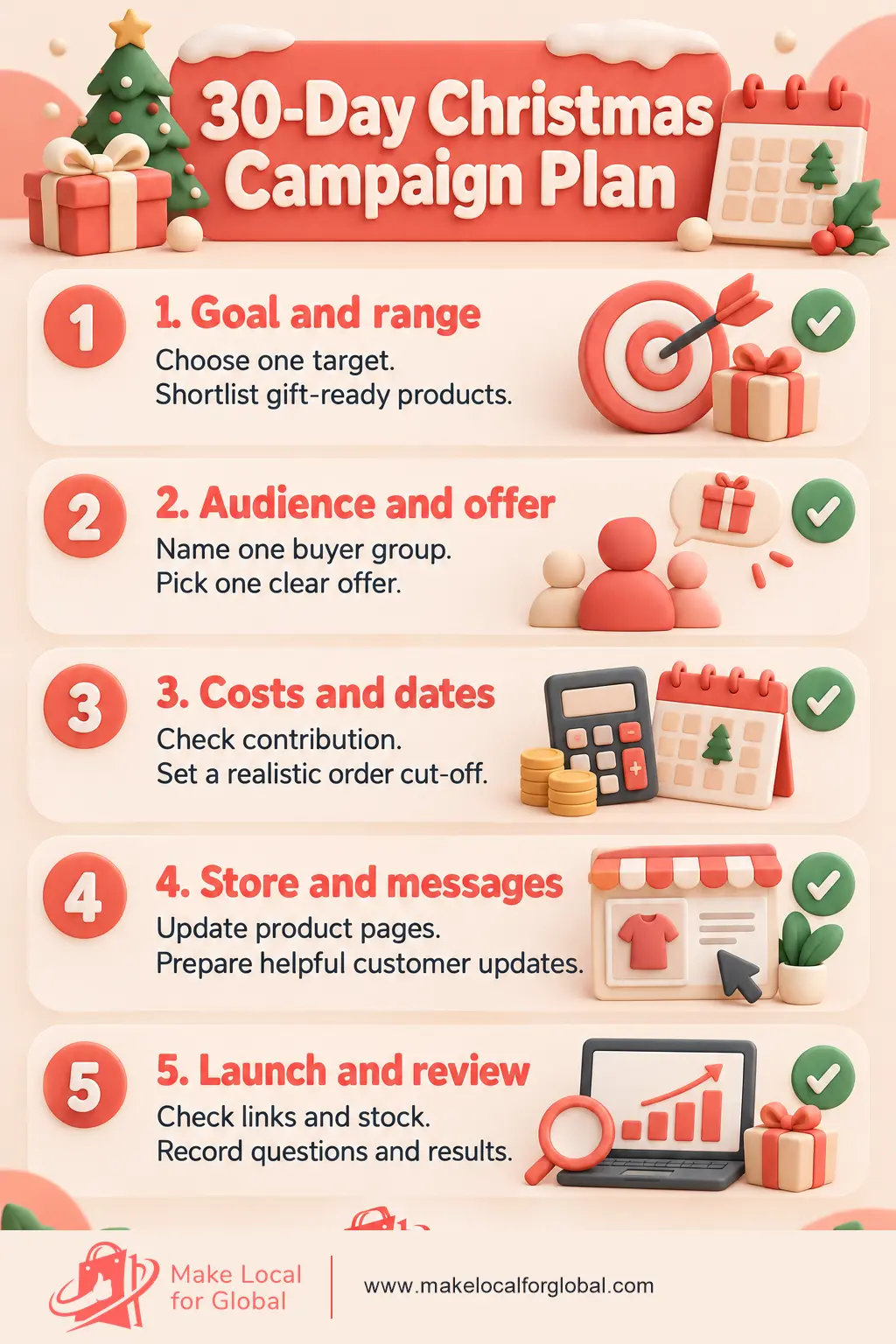
Start early enough to check stock, costs, product pages and delivery information before the main buying period. Many small shops use October to choose the plan, then launch selected gift content in November. Set dates from your own preparation and fulfilment needs.
There is no fixed number. Choose a manageable group with clear uses and reliable availability. A new store might begin with five to fifteen items across a few gift categories, then add products only when they help a shopper choose.
No. A bundle, free-delivery threshold, small gift or offer on selected products may fit better. Check what remains after product, packaging, payment and delivery costs before you set the terms.
Remove expired coupon codes, Christmas delivery claims and seasonal banners. Keep products that still fit the shop and update the wording for Boxing Day or New Year if you plan another offer.
When your products, offer and dates are ready, ask for help with the store changes you need. Share the details so the request is specific and easy to review.
PREFERRED SOURCE
Like what you’re reading? Add Make Local for Global as a preferred source on Google to see more of our articles when you search.




















Build your online presence without having to figure out everything yourself.