

Explore practical Christmas promotion ideas for ecommerce stores, from discounts and bundles to free delivery. Compare examples and check costs before launch.

A Christmas offer can give shoppers a reason to choose your store, but a discount is only one option. The right promotion fits your products, your costs and the way customers buy.
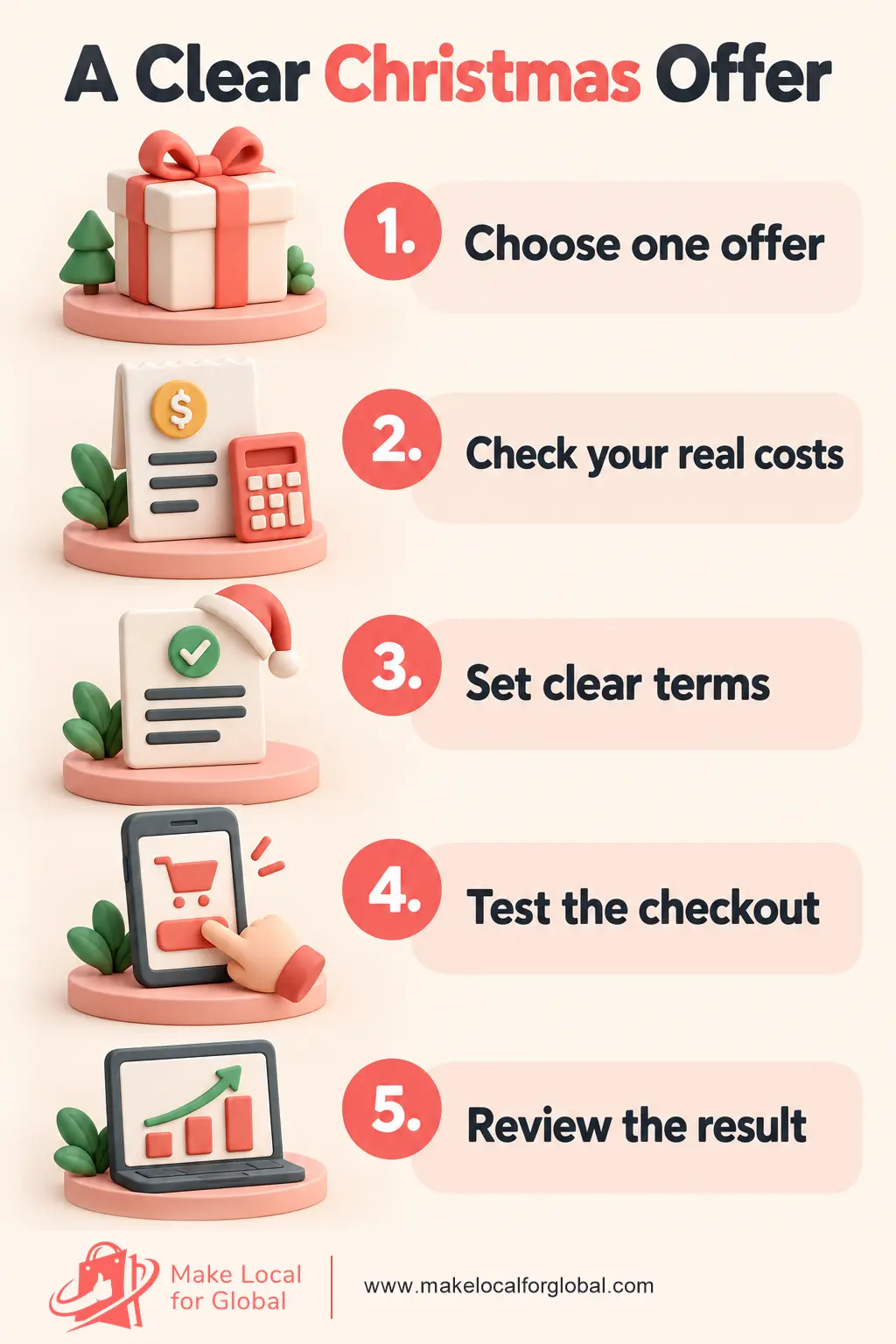
Start with one clear offer, then check what remains from each order before you announce it.
If your store pages or promotion details need work, Make Local for Global can help you plan the changes and make the customer journey easier to follow.
Think about the item, its usual price and what you want the order to do.
A £12 stocking filler may suit a multi-buy offer.
A £75 gift set may work better with a small free gift.
A store with a wide range might discount only selected products rather than cutting prices across the whole catalogue.
Write down three figures before choosing: the normal selling price, the costs linked to an order, and the lowest contribution you are willing to accept. Then test the offer against a typical basket.
An offer that looks generous on a banner can leave too little to cover the rest of the business.
A percentage code is easy to explain.
For example,
CHRISTMAS10 could take 10% off selected gifts.
A customer spending £40 would save £4.
The code can suit several products at different prices, though the saving rises with the basket total.
Set the eligible products and dates in plain language. “10% off selected gifts with CHRISTMAS10 until 14 December” tells the shopper what qualifies, how to claim the offer and when it ends. If the discount applies to only one collection, do not call it a store-wide sale.
Example: a £40 gift costs £16 to buy, £2 for packing, £3 for delivery support and £1.50 in payment fees. A £4 discount leaves £13.50 before advertising, returns, tax and other overheads. A 20% discount would take £8 off and leave £9.50 on the same assumptions. These figures are not a profit forecast; use your own order costs.
A fixed discount such as “£5 off when you spend £40” can make a threshold easy to understand. It may prompt a shopper with a £34 basket to add a suitable £8 item. The order rises to £42, and the customer pays £37 before delivery charges or other conditions.
Check the average basket and product prices first. If most items cost £10, a £40 threshold asks customers to buy four items. If your typical basket is £32, a £35 threshold may feel within reach.
Do not set the target so high that shoppers leave rather than add something useful.
“Free UK delivery over £50” is a promotion with a cost, even when the checkout labels the delivery as free. The store still pays the carrier or fulfilment partner. Work out what a typical £50 order costs to send, then check whether the product contribution covers it.
Suppose a shopper has £43 of products in the basket and adds a £9 gift to reach £52. That makes sense only if the extra item is wanted and the remaining order value can cover delivery and other costs. A threshold based on the smallest profitable basket is safer than copying another shop’s banner.
Examples include “Buy two, save 10%” or “Buy three, save 15%.” This can suit small gifts bought for several people, such as notebooks, decorations or pet accessories. Show which items count and whether customers can mix colours or designs.
Test the lowest-priced combination first. If the promotion applies to any three items, a shopper may choose the three least expensive products. Check that basket and the combination you hope customers will buy.
A small gift over a set spend can make a purchase feel more thoughtful.
For example, a stationery shop could include a £3 pencil pouch with orders above £50. State what the gift is, when it is included and what happens if stock runs out.
Count the gift’s purchase cost, packing time and extra postage. A bulky item may raise the delivery band. A low-cost add-on that fits the parcel can be more suitable than an attractive gift that adds a separate shipment.
A bundle groups products that solve one buying task, such as a mug and a matching coaster for a colleague. Show each item, the combined price and any saving. Read Christmas bundle ideas for ecommerce stores for ways to build a clear set without hiding the contents.

A selected-product sale is useful when only a few lines suit a discount.
You might offer 15% off last season’s wrapping paper and keep new gift sets at full price.
Label the collection and product pages so a shopper does not find a different price at checkout.

A returning-customer code can thank previous buyers.
For example, a small shop might email a 10% code to customers who bought a gift box earlier in the year. Check that the message goes to people who can receive marketing emails, and set a clear expiry date for the code.
A weekend offer or 48-hour promotion gives the campaign a defined window. Use real start and end times, then switch off the code when the period ends.
Do not say “ends tonight” and keep the same offer running under a new deadline. That weakens trust and makes later dates harder to believe.
For UK promotions, make significant closing-date conditions clear; repeatedly reset countdowns may mislead. See ASA guidance on promotional closing dates.
A product or bundle page should state what is included, what the customer pays and how delivery works. MLFG can help you plan clearer store updates for the campaign.
Use this simple contribution check before the promotion goes live:
| Illustrative £40 order | Amount |
|---|---|
| Customer pays | £40.00 |
| Product cost | −£16.00 |
| Packing | −£2.00 |
| Delivery support paid by shop | −£3.00 |
| Payment fee estimate | −£1.50 |
| £5 fixed discount | −£5.00 |
| Amount left before other costs | £12.50 |
Illustration only, not a profit forecast. Figures exclude advertising, returns, tax and overheads. Replace them with your own figures and confirm whether your prices include VAT.
Run the same check for a low-price order and for the largest likely basket.
A promotion can look fine on a £60 order yet leave little on a £20 order with free delivery.
If the result is too tight, lower the saving, raise a sensible threshold, limit the offer to certain products or choose a non-discount promotion.
Before launch, test the code on a phone and desktop.
Confirm the products qualify, the discount appears in the basket, delivery rules are clear and the end date uses the right time zone.
Check the campaign banner against the checkout; mismatched terms create support requests and abandoned orders.
Plan the follow-on too. Once the Christmas offer ends, remove the coupon, change the announcement bar and send shoppers to current products.
The next article in this series, How to Prepare Your Ecommerce Store for Christmas, covers the key storefront updates.
For the wider timeline, see our guide to planning a Christmas ecommerce campaign.
For channel ideas, read How to Promote Your Christmas Sale Online.
The same promotion can have a very different effect on a small item and a larger basket.
For a shop selling a £12 candle, a £28 gift set and a £46 hamper, the same promotion has different costs at each price point.
A 10% code reduces the candle by £1.20, the set by £2.80 and the hamper by £4.60. The saving is easy to calculate, but the shop still needs to know how much contribution remains after each product, packing, postage and payment fee.
A fixed £5 discount could be more noticeable on the £28 set than on a £12 item, but a £25 minimum spend means the candle alone does not qualify.
A free-delivery threshold at £35 might encourage someone buying a set to add a small extra item. It only makes sense if the extra postage cost does not remove the margin you need. The thresholds and figures here are illustrative, not universal advice.
For each candidate product, record the normal selling price, product cost, packaging, carrier cost, payment fee and amount left after the offer. Check a single-item order and a mixed basket. If a code can be combined with another discount, test that combination too.
Some shops find that a small gift or a useful bundle gives customers a clearer benefit than a deeper percentage reduction.
Think about how the offer will work in your actual ecommerce platform.
Can you select the right products?
Does the coupon exclude items that cannot support a discount?
Can your stock count handle a bundle that shares products with regular listings?
If a promotion needs several manual adjustments for every order, simplify it before launch.
A small jewellery seller might offer 10% off three ready-to-ship earrings. Made-to-order pieces stay at full price.
A bakery gift business might offer a tasting box at a fixed price, with ingredients and allergens clearly listed.
A homeware seller could offer free standard UK delivery above £45, with express delivery charged separately.
Each promotion has different terms, costs and fulfilment needs.
Write the offer in one sentence and ask someone unfamiliar with the shop what they think it means. If they cannot tell which products qualify, when it ends, whether delivery is included or what code to use, make the wording clearer. Put important conditions near the headline instead of hiding them in a separate page of small print.
Give yourself time to set up the code, check the product selection, update the banner and test checkout before the promotion starts. Put the campaign start and end date on a calendar. If a Christmas delivery promise is part of the message, set a separate order cut-off based on your own production time and carrier service.
During the promotion, watch customer questions and stock levels. If a product sells out, pause any message that directs people to it. If you extend a promotion, change the end date everywhere and explain the new terms. After it finishes, review orders, contribution and fulfilment workload before deciding whether to repeat it.
No. Free delivery over a sensible basket value, a useful bundle or a small gift can give customers a reason to buy without lowering every product price.
There is no safe percentage for every shop. Calculate the costs for the products in the offer and choose a saving that leaves enough contribution for your wider expenses.
You can run a new period if the terms are accurate. Update the code, date, banner, email and social copy together. Do not leave an expired message in one channel.
Pick one offer that fits a product people can understand quickly. Test its checkout path and cost maths before building more versions.
Choose one primary promotion, calculate the amount left after costs and write its conditions in one sentence. That sentence can guide your banner, product page, email and social posts.
Plan a clear offer, show it in the right places and guide shoppers to the product or collection that matches it.
PREFERRED SOURCE
Like what you’re reading? Add Make Local for Global as a preferred source on Google to see more of our articles when you search.











Build your online presence without having to figure out everything yourself.